
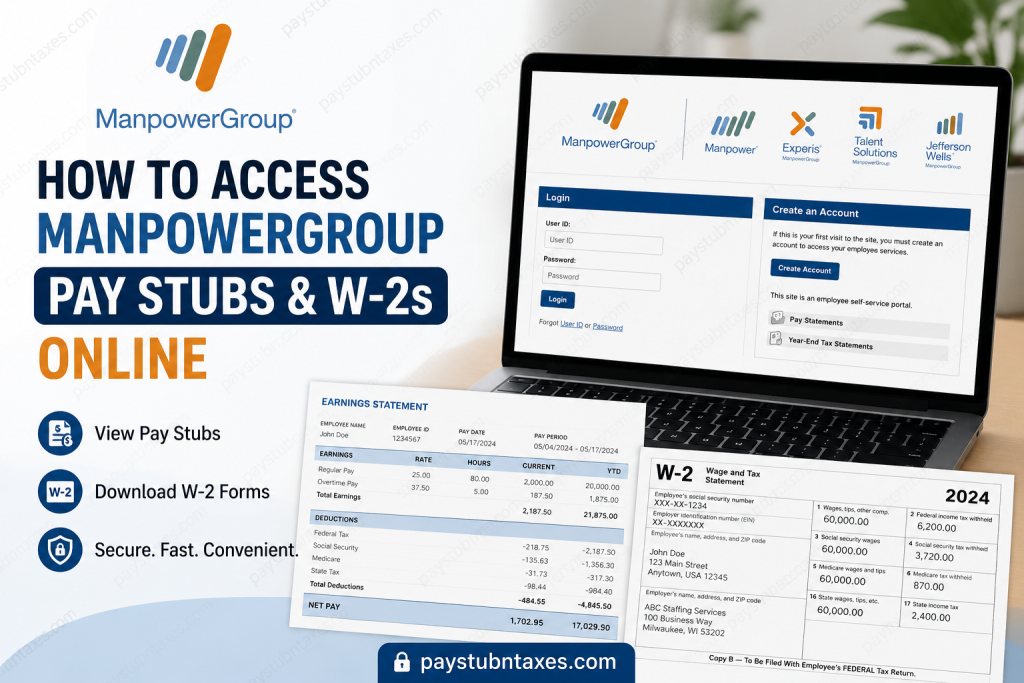
ManpowerGroup, formerly known as Manpower Inc., is one of the world’s foremost workforce solutions companies, connecting millions of people with meaningful employment opportunities across more than 75 countries and territories. Founded in 1948 and headquartered in Milwaukee, Wisconsin, the company delivers specialized staffing, recruitment, workforce consulting, outsourcing, and career management services through its globally recognized brands—Manpower, Experis, Talent Solutions, and Jefferson Wells. For employees in the United States, accessing payroll records has become remarkably straightforward. ManpowerGroup USA utilizes the Paperless Employee platform (Satellite) to provide secure online access to weekly pay stubs, annual W-2 tax forms, and other employment-related documents. Whether you are a current employee reviewing your latest earnings or preparing your tax return, the online portal enables you to retrieve your payroll information conveniently from virtually anywhere.
What Is the ManpowerGroup Paperless Employee Portal?
The Paperless Employee portal is a secure employee self-service platform that allows ManpowerGroup associates to:
- View and download weekly pay statements
- Access current and previous W-2 tax forms
- Elect electronic W-2 delivery
- Print copies of payroll documents
- Manage login credentials
- Update notification preferences
- Retrieve historical payroll records
The platform is designed to simplify payroll management while reducing paperwork and improving document security.
Portal URL: https://www.paperlessemployee.com/manpowergroup
How to Access Your ManpowerGroup Pay Stubs
If you already have an account, retrieving your pay statements only takes a few minutes.
Step 1: Visit the Paperless Employee Portal
Open your browser and navigate to: https://www.paperlessemployee.com/manpowergroup
Step 2: Sign In
Enter your:
- User ID
- Password
Then click Login.
If you’ve forgotten your credentials, use the Forgot User ID or Forgot Password links on the login page.
Step 3: Open Pay Statements
After signing in:
- Select Pay Statements
- Choose the desired payroll date
- Open the statement
The portal allows you to:
- View online
- Download as PDF
- Print for your records
The Paperless Employee guide also explains that employees may access either full pay statements or summary pay statements, with full statements available for viewing, downloading, or printing as PDF documents.
How to Access Your ManpowerGroup W-2 Online
Annual tax forms are available electronically for employees who have enrolled in online delivery.
Step 1: Log into Paperless Employee
Visit: https://www.paperlessemployee.com/manpowergroup
Sign in using your User ID and Password.
Step 2: Select Year-End Tax Statements
Choose: Year-End Tax Statements
Step 3: Choose Your Tax Year
Select the desired year.
Step 4: Download Your W-2
You can:
- View your W-2
- Download a PDF copy
- Print multiple copies whenever necessary
First-Time Users: How to Create a Paperless Employee Account
New employees must register before accessing payroll information.
Registration Process
- Visit the Paperless Employee portal.
- Click Create Account.
- Enter your:
- Employee ID
- Social Security Number
- Date of Birth
- Verify your identity.
- Create a unique User ID and Password.
- Set security questions.
- Verify your email address.
- Select your electronic notification preferences.
- Complete the registration process.
The registration workflow includes identity verification, creation of login credentials, security questions, email verification, and optional electronic notification settings before the account becomes active.
Enroll for Electronic W-2 Delivery
Employees are encouraged to elect electronic delivery before December 31.
Benefits include:
- Earlier access to tax forms
- Secure online storage
- Immediate PDF download
- Free online copies through the designated availability period
Employees who do not enroll before the annual deadline will generally receive a printed W-2 by mail no later than January 31.
What If You Register After December 31?
If you create your Paperless Employee account or elect electronic W-2 delivery after December 31, your W-2 will still be printed and mailed to the address on file by January 31. Electronic access for that tax year may not replace the mailed copy.
Keep Your Mailing Address Current
Before year-end, verify that your payroll information is accurate.
Be sure to:
- Review your latest pay stub
- Confirm your mailing address
- Update your email and phone number if necessary
- Notify your local branch of any corrections before December 31
Remember that W-2 forms are mailed to your mailing address, not your home address, so maintaining accurate records is essential.
Need Another Copy of Your W-2?
If you require a replacement:
- Requests generally begin February 16.
- Submit your request through your local ManpowerGroup branch using the required W-2 request process.
- Additional reprints may incur a fee, while timely electronic enrollment provides free online copies through the applicable period.
Common Login Issues
If you’re unable to access your account:
Forgotten User ID
Select Forgot User ID on the login page.
Forgotten Password
Use Forgot Password and complete identity verification.
First-Time Login Problems
Ensure you are using your newly created User ID, not your Employee ID.
Account Locked
Wait briefly and retry, or follow the account recovery instructions.
Browser Issues
Clear your browser cache or try a different browser.
Benefits of Using Paperless Employee
Using the online portal offers numerous advantages:
- Secure payroll access 24/7
- Faster W-2 availability
- Paperless document storage
- Easy PDF downloads
- Printable pay statements
- Reduced risk of lost paperwork
- Convenient access from virtually anywhere
Contact ManpowerGroup for Payroll Assistance
If you cannot access your payroll information after troubleshooting:
- Contact your local ManpowerGroup branch
- Reach out to your recruiter or payroll representative
- Use the support resources available through the Paperless Employee portal
Conclusion
ManpowerGroup has streamlined payroll administration through the Paperless Employee portal, enabling employees to access pay statements and W-2 tax forms securely, efficiently, and at their convenience. By registering for an account, opting into electronic tax document delivery before the year-end deadline, and keeping your personal information up to date, you can ensure uninterrupted access to your payroll records while minimizing delays during tax season. Whether you need your latest pay stub, a historical payroll record, or your annual W-2, the Paperless Employee platform offers a reliable, paper-free solution that places your employment documents at your fingertips.
Frequently Asked Questions
1. How do I access my ManpowerGroup pay stubs online?
Visit the Paperless Employee portal at https://www.paperlessemployee.com/manpowergroup, log in with your User ID and Password, then select Pay Statements to view, download, or print your pay stubs.
2. Where can I find my ManpowerGroup W-2 online?
After signing into the Paperless Employee portal, click Year-End Tax Statements and select the applicable tax year to view or download your W-2.
3. What is the ManpowerGroup Paperless Employee portal?
Paperless Employee is the secure employee self-service portal used by ManpowerGroup USA employees to access pay statements, W-2 forms, and other payroll-related documents online.
4. How do I create a Paperless Employee account?
Click Create Account on the login page and verify your identity using your Employee ID, Social Security Number, and Date of Birth. Then create your User ID, Password, and security questions.
5. What information do I need to register?
You’ll generally need your:
- Employee ID
- Social Security Number
- Date of Birth
- Personal email address
6. Can I download and print my pay stubs?
Yes. Employees can download pay statements as PDF files and print them whenever needed.
7. When will my ManpowerGroup W-2 become available?
Employees who enroll in electronic delivery before the annual deadline may receive online access earlier, while paper copies are generally mailed no later than January 31.
8. What happens if I enroll in electronic W-2 delivery after December 31?
If you enroll after the deadline, your W-2 will typically still be mailed to your address on file rather than being delivered electronically for that tax year.
9. I forgot my Paperless Employee password. What should I do?
Click Forgot Password on the login page and follow the verification steps to securely reset your password.
10. Can former ManpowerGroup employees access Paperless Employee?
Former employees may have limited access depending on company policy. If you cannot log in, contact your local ManpowerGroup branch or payroll representative.
11. How do I update my mailing address for my W-2?
Update your address before December 31 through the appropriate employee system or notify your local ManpowerGroup branch to help ensure your W-2 is mailed correctly.
12. Can I access previous years’ W-2 forms?
Yes. If available in your Paperless Employee account, you can view and download prior-year W-2 tax statements.
13. Is the Paperless Employee portal secure?
Yes. Paperless Employee uses secure authentication and account verification to protect employee payroll and tax information.
14. What should I do if my W-2 contains incorrect information?
Contact your local ManpowerGroup branch or payroll department immediately so they can review the issue and advise you on obtaining a corrected W-2 if necessary.
15. Who should I contact if I cannot access my pay stubs or W-2?
If you continue experiencing login or payroll issues, contact your local ManpowerGroup branch, recruiter, or payroll support team for assistance with your account.

