
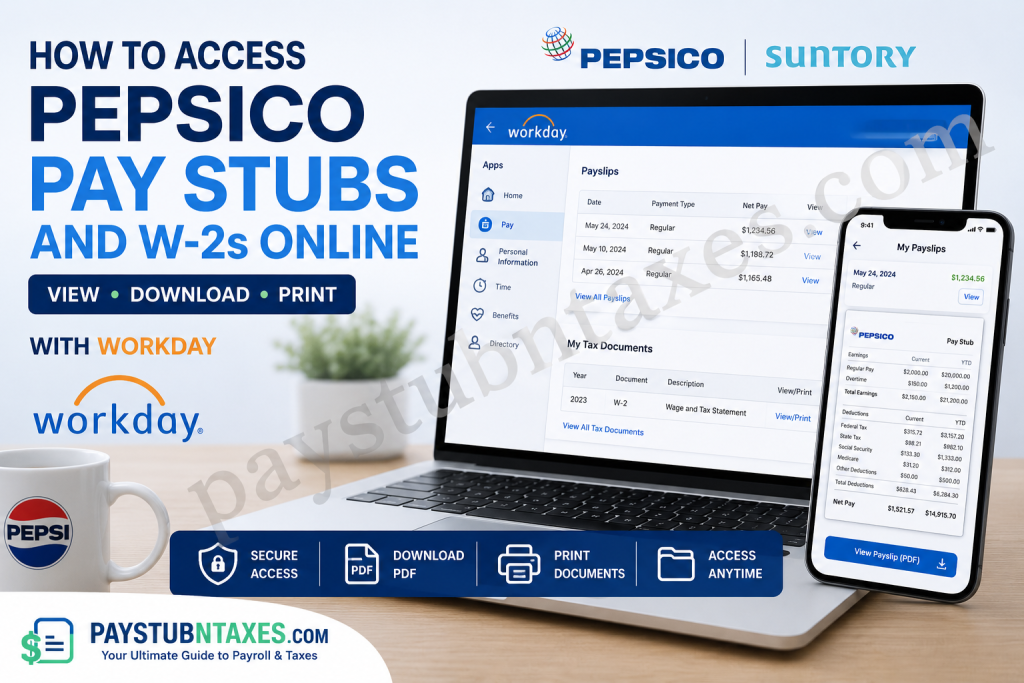
In today’s increasingly digital workplace, employees expect immediate, secure, and convenient access to their payroll information. Fortunately, Pepsi Bottling Ventures (PBV), jointly owned by Suntory and PepsiCo, provides its workforce with an efficient self-service platform through Workday, enabling employees to view pay stubs, download W-2 forms, update personal information, and manage various employment records from virtually anywhere. Whether you need a recent payslip for income verification, a historical pay statement for financial planning, or your annual W-2 form for tax filing purposes, this comprehensive guide will walk you through every step of the process.
About Pepsi Bottling Ventures (PBV)
Pepsi Bottling Ventures (PBV) is one of the largest beverage bottlers and distributors in the United States. Jointly owned by Suntory Holdings and PepsiCo, the company represents more than a century of innovation and excellence in the global beverage industry.
PBV manufactures, sells, and distributes a broad portfolio of beverages, including:
- Pepsi products
- Keurig Dr Pepper beverages
- Nature’s Twist lemonades
- Various regional and national beverage brands
Operating across multiple states, PBV has built a legacy of delivering beloved beverages while fostering a culture of innovation, sustainability, and employee development.
What Is Workday?
Workday is Pepsi Bottling Ventures’ secure Human Resources and Payroll platform. Employees can use the system to:
- View and print pay stubs
- Access annual W-2 tax forms
- Update personal information
- Review tax withholding elections
- Manage direct deposit information
- View time balances
- Access employment records
Because the platform stores payroll information electronically, employees no longer need to wait for paper statements or contact Human Resources for routine payroll documents.
PepsiCo Workday Login Information
Workday Production URL
https://wd503.myworkday.com/pbv/login.flex
Workday Mobile App Organization ID: pbv
For the best user experience, Workday recommends accessing the system using Google Chrome.
How to Access PepsiCo Pay Stubs Online
Obtaining your pay statements through Workday is remarkably straightforward.
Step 1: Sign In to Workday
Visit: https://wd503.myworkday.com/pbv/login.flex
Enter your:
- Username
- Password
Then click Sign In.
Step 2: Open the Pay Application
After logging in:
- Navigate to the Workday homepage.
- Select the Pay application.
Step 3: Access Payslips
Under the View section:
- Click Payslips.
- The My Payslips page will appear.
- Locate the desired pay period.
- Select View beside the corresponding paycheck.
Step 4: Download or Print Your Pay Stub
After opening the payslip, you can:
- Download the payslip as a PDF file.
- Print a paper copy for your records.
- Save electronic copies for future reference.
Your pay stub generally contains the following information:
- Company information
- Gross earnings
- Net pay
- Current and year-to-date totals
- Federal and state tax withholdings
- Pre-tax and post-tax deductions
- Employer-paid benefits
- Taxable wages
- Payment details
Maintaining copies of your pay stubs is advisable, particularly when applying for loans, mortgages, apartments, or government benefits.
How to Access PepsiCo W-2 Forms Online
Workday also serves as the central repository for annual tax documents.
Step 1: Log In to Workday
Visit: https://wd503.myworkday.com/pbv/login.flex
Sign in using your employee credentials.
Step 2: Open the Pay Dashboard
From your Workday homepage:
- Click Pay.
- Select My Tax Documents.
Step 3: Locate Your W-2 Form
Within the My Tax Documents section, you will find:
- Current-year W-2 forms
- Historical W-2 documents, if available
- Printing preferences
Choose the appropriate tax year.
Step 4: View and Print
Click View/Print to open your W-2.
You may then:
- Print the document
- Download a PDF copy
- Save the form electronically for tax filing purposes
Why Your W-2 Form Is Important
The Form W-2 summarizes your annual:
- Total wages
- Federal income tax withheld
- Social Security wages and taxes
- Medicare wages and taxes
- State and local tax information
- Retirement contributions and benefits
You will typically need your W-2 when:
- Filing federal income taxes
- Applying for financial aid
- Verifying employment income
- Applying for mortgages or loans
- Preparing state tax returns
Accessing Workday Through the Mobile App
Employees who prefer managing payroll information on their smartphones can install the Workday application.
Organization ID:pbv
After entering the organization ID, sign in using your regular Workday credentials to access:
- Pay stubs
- W-2 forms
- Benefits information
- Personal data
- Payroll records
The mobile application provides flexibility, allowing employees to access their information while travelling or working remotely.
Forgot Your Password?
If you cannot sign in:
- Visit the Workday login page.
- Click Forgot Your Password?
- Follow the instructions to reset your credentials.
Need Help Accessing Workday?
If you experience technical difficulties, contact the:
PBV Service Desk
Phone: 866-737-7443
The support team can assist with:
- Password resets
- Login issues
- Account lockouts
- Multi-factor authentication problems
- Access to payroll documents
Benefits of Electronic Pay Statements and W-2 Forms
Using Workday provides numerous advantages:
1. Instant Access
Documents are available 24 hours a day.
2. Enhanced Security
Payroll information is protected by enterprise-grade security protocols.
3. Paperless Convenience
No need to store physical copies.
4. Faster Tax Filing
W-2 forms can be downloaded immediately once released.
5. Centralized Recordkeeping
All payroll records remain in one secure location.
Final Thoughts
Pepsi Bottling Ventures has embraced modern workforce technology by implementing Workday as its centralized Human Resources and Payroll platform. Through a few simple clicks, employees can securely access their pay stubs, download W-2 forms, update personal information, and manage essential employment records without the inconvenience of paper documentation. Whether you need a recent payslip for income verification or your W-2 form for tax season, Workday places your payroll information right at your fingertips—efficiently, securely, and whenever you need it.
Frequently Asked Questions
1. How do I access my PepsiCo pay stubs online?
Log in to the Workday portal and select the Pay app followed by Payslips.
2. What is the PepsiCo Workday login URL?
The Workday login URL is: https://wd503.myworkday.com/pbv/login.flex.
3. What is the Workday organization ID for PBV employees?
The organization ID is pbv.
4. Can I download my pay stub as a PDF?
Yes. Workday allows you to download and save payslips in PDF format.
5. How do I print my PepsiCo pay stub?
Open the desired payslip and click the print icon.
6. Where can I find my W-2 form in Workday?
Navigate to Pay > My Tax Documents to access your W-2 forms.
7. When are W-2 forms available in Workday?
W-2 forms are generally published annually before the IRS filing deadline.
8. Can former employees access their W-2 forms?
Former employees may still have access depending on company policy. Contact the PBV Service Desk if you cannot log in.
9. Can I access Workday from my phone?
Yes. Download the Workday mobile app and enter the organization ID pbv.
10. What information appears on a pay stub?
Pay stubs typically include earnings, taxes, deductions, benefits, and year-to-date totals.
11. What should I do if I forget my Workday password?
Click Forgot Your Password? on the login page and follow the reset instructions.
12. Is Workday secure?
Yes. Workday uses advanced security measures to protect employee payroll and personal information.
13. Why do I need my W-2 form?
You need your W-2 to file income taxes, verify earnings, and apply for loans or financial aid.
14. Who should I contact if I cannot access my account?
Contact the PBV Service Desk at 866-737-7443 for assistance.
15. Can I view previous pay stubs and W-2 forms in Workday?
Yes. Historical payroll documents are generally stored within Workday and can be viewed anytime you have access to your account.

