
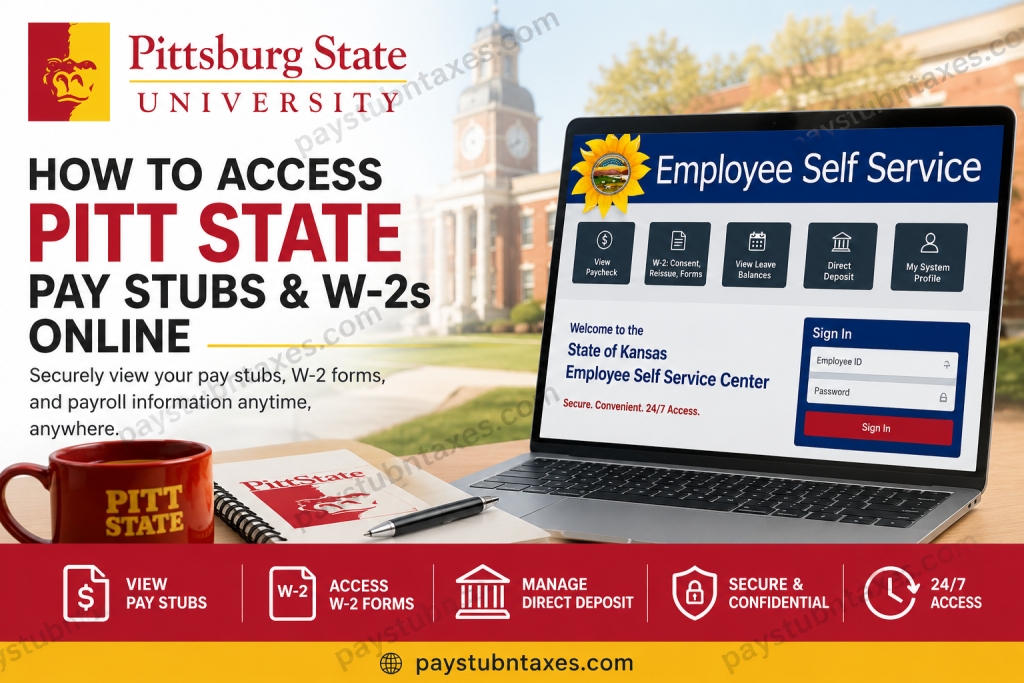
Pittsburg State University (Pitt State) has streamlined payroll and tax administration through the State of Kansas Employee Self-Service (ESS) Portal, enabling employees to access pay stubs, W-2 forms, direct deposit information, and personal payroll records securely from anywhere. Whether you are a faculty member, staff employee, graduate assistant, or student worker, the ESS portal serves as your central hub for payroll management and tax documentation. As one of Kansas’ premier public universities, Pittsburg State University is renowned for its hands-on learning philosophy, academic excellence, and commitment to student and employee success. Established in 1903, the university today serves more than 5,500 students and employs hundreds of faculty and staff members who rely on the ESS platform to manage their employment information efficiently.
What Can You Do Through Employee Self-Service?
The ESS portal allows Pitt State employees to:
- View current and previous paychecks
- Access W-2 and W-2c tax forms
- Update direct deposit information
- Manage personal information
- Review leave balances
- Update federal tax withholding information
- View total compensation statements
- Update contact information and email addresses
- Change passwords and security questions
The system is designed to provide employees with secure, round-the-clock access to essential employment records.
How to View Pitt State Pay Stubs Online
Step 1: Sign In
Go to: https://sharp.sok.ks.gov/psp/sokhrprdess/signon.html
Enter:
- Employee ID
- Password
If you have forgotten your password, select Forgot Your Password?
Step 2: Open the View Paycheck Tile
After signing in: Employee Self-Service → View Paycheck
You can then:
- View current pay statements
- Download paycheck information
- Print pay stubs for your records
How Long Are Pay Stubs Available?
- Paycheck information remains available for a minimum of three calendar years.
- Former employees can continue accessing paycheck data for 18 months following separation from employment.
Understanding Direct Deposit at Pitt State
Pitt State requires all employees to participate in Electronic Funds Transfer (EFT), commonly known as direct deposit.
Employees may:
- Use up to six financial institutions
- Maintain as many as ten separate accounts
- Divide deposits among checking and savings accounts
Direct deposits generally become available on:
- Friday payday
- The preceding workday, if Friday is a designated holiday.
This policy applies to:
- Regular paychecks
- Supplemental payments
- Court-ordered withholding payments
How to Access Your W-2 Online
The State of Kansas allows employees to receive W-2 forms electronically through ESS.
Step 1: Log Into ESS
Visit: https://sharp.sok.ks.gov/psp/sokhrprdess/signon.html
Step 2: Open W-2 Forms
Navigate to: Employee Self-Service → W-2: Consent, Reissue, Forms
Step 3: View Your W-2
Click: View W-2/W-2c Forms
Then:
- Select the desired tax year.
- Download or print your W-2.
Employees can also access up to five years of prior W-2 forms after completing electronic consent.
How to Consent to Electronic W-2 Delivery
Electronic consent only needs to be completed once.
Steps
- Log into ESS.
- Open W-2 Consent, Reissue, Forms.
- Check:
I consent to receive W-2 or W-2c forms electronically.
- Click Submit.
- Verify your identity by entering your password.
- Click Continue.
Your consent remains active until:
- You withdraw consent
- Retirement
- Employment termination
- Death
Benefits of Electronic W-2 Forms
Choosing electronic delivery offers several advantages:
✅ Faster access to tax forms
✅ Ability to print copies anytime
✅ Reduced risk of lost mail
✅ Environmentally friendly
✅ Immediate access for tax filing and financial aid applications
Employees who do not consent electronically will receive paper W-2 forms mailed by January 31 each year.
First-Time Login Instructions
If you are signing into ESS for the first time:
Initial Password
Your temporary password is:
- The first two letters of your last name (lowercase)
- Plus the last six digits of your Social Security Number.
After signing in, you should:
- Create a new password
- Set up security questions
- Update your email address
- Save your profile settings
How to Find Your State of Kansas Employee Number
Your State of Kansas Employee ID consists of:
One letter followed by ten digits
Example: K1234567890
To locate your Employee Number:
GUS Cloud → Others → My Dashboard → My GUS HR Information → State of Kansas Employee Number
If you cannot access the report, contact Human Resources by emailing: hr@pittstate.edu
Include:
- Your full name
- Employee ID
- Supervisor’s name
Troubleshooting Common ESS Issues
Forgot Password
Use: Forgot Your Password?
You may reset your password using your security question.
Locked Out of Your Account
Contact: State Employee Self-Service Help Desk
Topeka Area: (785) 296-1900
Toll-Free: 1-866-999-3001
Hours: Monday-Friday; 8:00 AM – 4:30 PM
Cannot View W-2 Forms
Try the following:
- Disable pop-up blockers.
- Verify your preferred email address.
- Use a different browser such as:
- Google Chrome
- Mozilla Firefox
- Contact the Help Desk if problems persist.
Human Resources Contact Information
Pittsburg State University Human Resources
Email: hr@pittstate.edu
State Employee Self-Service Help Desk
Topeka: (785) 296-1900
Toll-Free: 1-866-999-3001
Hours: Monday-Friday
8:00 AM – 4:30 PM
Final Thoughts
Pittsburg State University has embraced digital payroll management by providing employees with secure online access to pay stubs, W-2 forms, tax information, and direct deposit services through the State of Kansas Employee Self-Service Portal. By familiarising yourself with ESS and electing electronic delivery of tax documents, you can manage your payroll information swiftly, securely, and with remarkable convenience, all without waiting for paper documents to arrive in the post. Information in this guide is based on Pitt State Human Resources and State of Kansas Employee Self-Service resources.
Frequently Asked Questions
1. What is the Pitt State Employee Self-Service (ESS) Portal?
The ESS Portal is an online system that allows Pittsburg State University employees to view pay stubs, W-2 forms, direct deposit information, leave balances, and personal payroll records.
2. What is the ESS login website?
The official login page is:
https://sharp.sok.ks.gov/psp/sokhrprdess/signon.html
3. How do I view my Pitt State pay stubs?
After logging into ESS, click View Paycheck to see and print your current and previous pay statements.
4. How do I access my W-2 online?
Navigate to: Employee Self Service → W-2: Consent, Reissue, Forms → View W-2/W-2c Forms.
5. Do I need to consent to receive my W-2 electronically?
Yes. You must complete a one-time electronic consent in ESS to receive your W-2 online.
6. Will I still receive a paper W-2 after consenting electronically?
No. Once electronic consent is given, you will no longer receive a paper W-2 unless you withdraw your consent.
7. How many years of W-2 forms are available online?
Employees can access the current W-2 and up to five prior years of W-2 forms.
8. How long are pay stubs available online?
Paycheck information remains available for at least three calendar years.
9. How long can former employees access ESS?
Former employees can access their pay stubs and W-2 information for up to 18 months after separation.
10. What is my initial ESS password?
The first-time password is:
- The first two letters of your last name (lowercase), plus
- The last six digits of your Social Security Number.
11. How do I find my State of Kansas Employee ID?
Log in to GUS Cloud and navigate to:
Others → My Dashboard → My GUS HR Information → State of Kansas Employee Number.
12. Can I split my paycheck into multiple bank accounts?
Yes. Employees may use up to six financial institutions and ten separate accounts for direct deposit.
13. What should I do if I forget my password?
Click Forgot Your Password? on the ESS login page and follow the instructions to reset your password.
14. Who do I contact if I cannot log in?
Contact the State Employee Self-Service Help Desk:
- Topeka Area: (785) 296-1900
- Toll-Free: 1-866-999-3001
15. Who can help with payroll or employee information?
Contact Pittsburg State University Human Resources:
- Email: hr@pittstate.edu
- Office Hours: Monday–Friday, 8:00 AM–4:30 PM.

