
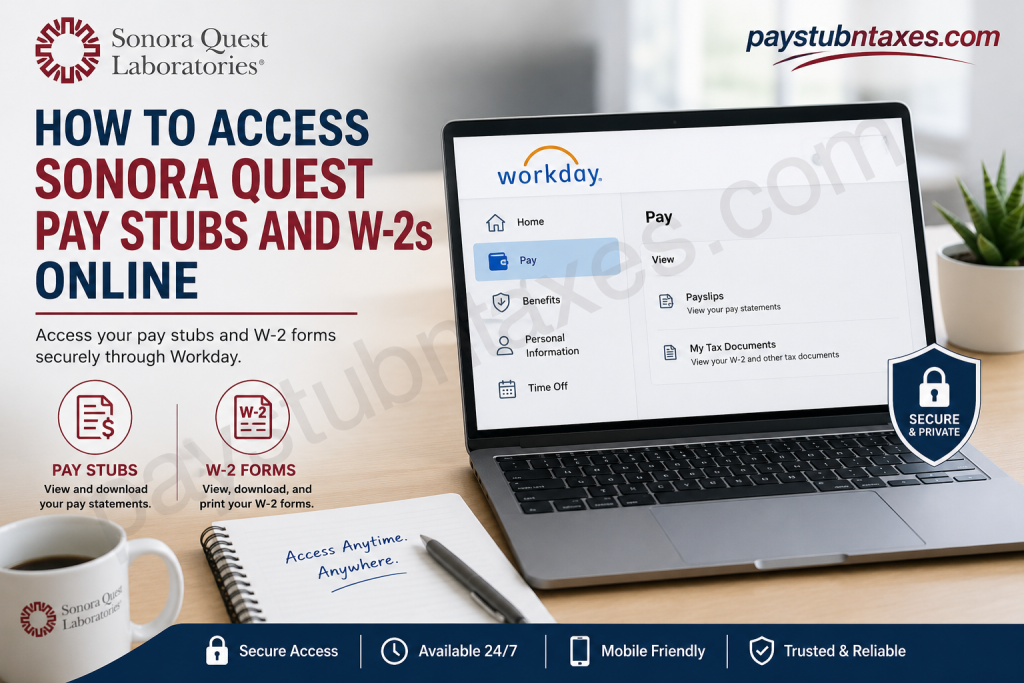
Employees of Sonora Quest Laboratories and Banner Health enjoy convenient digital access to payroll and tax documents through the Workday self-service platform. Whether you need to review a recent paycheck, download a historical payslip, or retrieve your annual W-2 form for tax filing, Workday provides secure, round-the-clock access from both desktop and mobile devices. As one of the nation’s largest integrated laboratory systems, Sonora Quest Laboratories serves millions of patients annually and employs approximately 3,900 professionals across Arizona. The organization’s commitment to innovation extends beyond laboratory diagnostics to employee services, offering streamlined digital access to essential employment records.
About Sonora Quest Laboratories
Sonora Quest Laboratories, a subsidiary of Laboratory Sciences of Arizona, is a joint venture between Banner Health and Quest Diagnostics. The organization performs more than 100 million diagnostic tests annually and operates over 70 patient service centers throughout Arizona. Its extensive test menu spans routine laboratory testing, molecular diagnostics, genetic and genomic testing, women’s health services, pathology, and prescription drug monitoring. The laboratory system is accredited by the College of American Pathologists (CAP), widely recognized as the gold standard in laboratory accreditation.
How to Access Sonora Quest Pay Stubs Online
Current employees can conveniently access their pay statements through the Workday portal or the Workday mobile application.
Step 1: Visit the Workday Login Portal
Open the Sonora Quest/Banner Health Workday portal:
Workday Login:
https://wd108.myworkday.com/bannerhealth/login.htmld
Enter your username and password, then select Sign In.
Step 2: Navigate to Payslips
After logging in:
- Click Pay from the Workday dashboard.
- Select Payslips.
- A list of your recent pay periods will appear.
- Click the desired paycheck to view detailed earnings information.
- Use the filter option to adjust date ranges and access older pay statements.
Step 3: Download or Print Your Pay Stub
Once the payslip opens:
- Select the PDF icon or Download option.
- Save the file to your device for future reference.
- Print the document if a physical copy is required.
Workday stores electronic pay records securely, allowing employees to retrieve them whenever needed.
How to Access Your Sonora Quest W-2 Online
Your annual W-2 tax statement is also available through Workday.
Steps to Retrieve Your W-2:
- Log into Workday.
- Select Pay.
- Click My Tax Documents.
- Choose the tax year you wish to access.
- Select View/Print to download or print your W-2 form.
If corrections are issued, Workday may also display a W-2C (Corrected Wage and Tax Statement).
When Will Paper W-2 Forms Be Mailed?
Employees who opted for paper delivery rather than electronic access can expect their W-2 forms to be mailed on or before January 31 each year, in compliance with federal regulations.
Therefore, if your electronic W-2 is unavailable, ensure that your mailing address in Workday is accurate to avoid delays.
Accessing Workday Through the Mobile App
Workday’s mobile application offers the flexibility to manage payroll information while on the move.
Download the Workday App
- Apple App Store: Available for iPhone and iPad devices.
- Google Play Store: Available for Android devices.
The mobile app allows employees to:
- View payslips
- Access W-2 forms
- Update personal information
- Review benefits
- Request time off
- Receive notifications and approvals
Setting Up Workday Mobile
After downloading the app:
- Launch the Workday application.
- Configure your organization’s tenant.
- Sign in using your Banner Health credentials.
- Complete multi-factor authentication if prompted.
- Create a mobile PIN for faster future access.
Once configured, employees can securely access payroll records anytime and anywhere.
How to Update Your Personal Information in Workday
Maintaining accurate information is essential for tax reporting and payroll processing.
To update personal details:
- Open your Workday profile.
- Select Personal Data.
- Edit the desired information, such as:
- Address
- Phone number
- Emergency contacts
- Name changes
- Submit the updates for approval if required.
Keeping your address current ensures timely delivery of paper W-2 forms and other important correspondence.
Troubleshooting Workday Login Issues
If you encounter login problems:
- Use the Forgot Password option on the login page.
- Verify that multi-factor authentication is functioning properly.
- Clear your browser cache or try another browser.
- Confirm your network connection.
For additional assistance, contact:
HR Transaction Support
Email: HRTransactionSupport@bannerhealth.com
Benefits of Electronic Pay and Tax Documents
Digital payroll access offers numerous advantages:
- Instant access to historical records
- Enhanced security and privacy
- Reduced paperwork
- Faster tax preparation
- Environmentally friendly document storage
By leveraging Workday’s self-service capabilities, Sonora Quest employees can manage payroll and tax documentation with efficiency and confidence.
Final Thoughts
The Sonora Quest Workday platform simplifies access to pay stubs and W-2 forms through a secure and intuitive interface. Whether you prefer using a desktop computer or the Workday mobile app, retrieving payroll information requires only a few clicks. By embracing digital payroll management, employees gain greater convenience, improved accessibility, and peace of mind during tax season. For the smoothest experience, keep your login credentials secure, maintain up-to-date personal information, and download important tax documents promptly each year.
Frequently Asked Questions
1. How do I access my Sonora Quest pay stubs online?
Log in to the Workday portal using your employee credentials, select Pay, and click Payslips to view or download your pay statements.
2. What is the Workday login URL for Sonora Quest employees?
Employees can access Workday through the Banner Health portal:
https://wd108.myworkday.com/bannerhealth/login.htmld
3. How do I download my pay stub as a PDF?
After opening a pay statement in Workday, click the PDF or Download icon to save or print the document.
4. Where can I find my W-2 form in Workday?
Log in to Workday and navigate to Pay > My Tax Documents. Select the desired tax year and click View/Print.
5. When are Sonora Quest W-2 forms available?
Electronic W-2 forms are typically available in Workday by late January each year.
6. When will paper W-2 forms be mailed?
Employees who elected paper delivery receive their W-2 forms on or before January 31.
7. Can former employees access their W-2 online?
Former employees may retain access for a limited period. If access is unavailable, contact HR Transaction Support for assistance.
8. Is there a Workday mobile app for Sonora Quest employees?
Yes. The Workday app is available for both iOS and Android devices via the Apple App Store and Google Play Store.
9. What can I do using the Workday mobile app?
Employees can:
- View pay stubs
- Access W-2 forms
- Update personal information
- Request time off
- View benefits
- Receive notifications
10. How do I reset my Workday password?
Use the Forgot Password link on the Workday login page or contact HR support if additional assistance is needed.
11. Why can’t I see my W-2 in Workday?
Possible reasons include:
- The form has not yet been released.
- You selected paper delivery.
- Your account access has expired.
- There is a temporary system issue.
12. How do I update my mailing address for tax documents?
Log in to Workday, open your profile, select Personal Information, update your address, and submit the changes.
13. What should I do if I experience Workday login issues?
Clear your browser cache, verify your credentials, ensure multi-factor authentication is working, or contact HR support.
14. Who do I contact for payroll or Workday assistance?
For login support or system issues, contact:
HRTransactionSupport@bannerhealth.com
15. Is Workday secure for accessing payroll information?
Yes. Workday uses secure authentication, encryption, and multi-factor authentication to protect employee payroll and tax data.

