
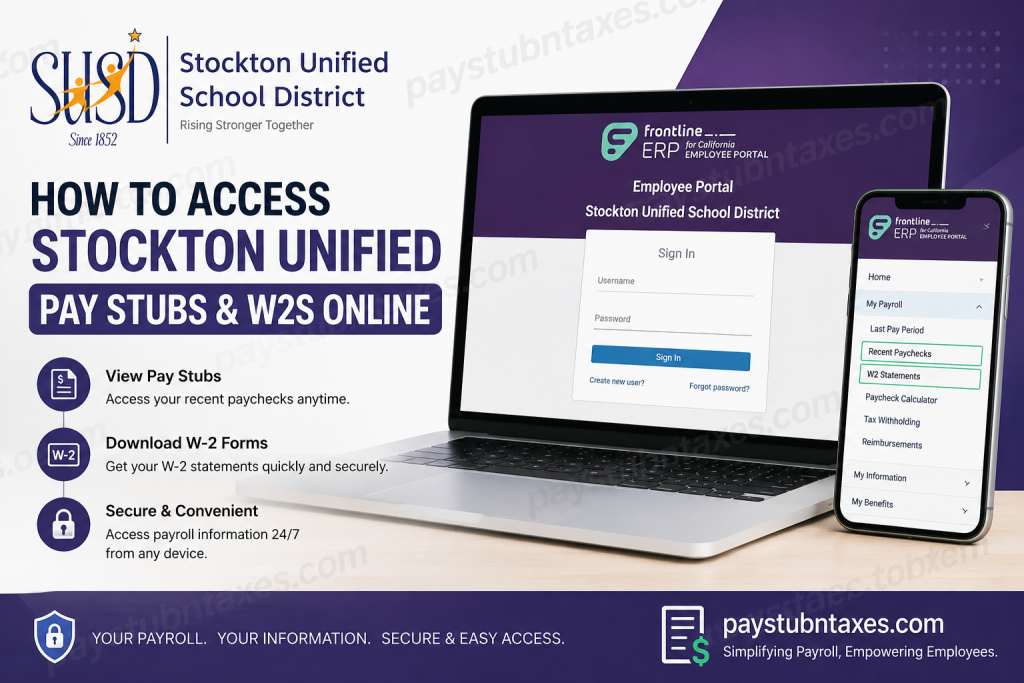
Managing payroll documents online has become an essential convenience for employees, and the Stockton Unified School District (SUSD) provides a secure and user-friendly solution through the Frontline ERP Employee Portal. Whether you need to review your latest paycheck, download a W-2 form for tax filing, or reset your account password, the online portal allows you to access everything in one place from any device. Stockton Unified School District serves more than 38,000 students across Stockton, California, operating dozens of elementary, K-8, comprehensive high schools, and alternative education campuses. The district continues to modernize employee services by offering digital payroll access through the Frontline ERP for the California Employee Portal.
Stockton Unified Employee Portal Login
SUSD employees can access their payroll information through the official Frontline ERP portal:
Employee Portal Login
Stockton Unified Frontline ERP Employee Portal
Through this portal, employees can:
- View and download pay stubs
- Access W-2 statements
- Review leave balances
- Check payroll history
- Update withholding information
- Manage employee profile details
- Review benefits and reimbursements
How to Access Stockton Unified Pay Stubs Online
Once logged into the portal, employees can quickly access recent paycheck information.
Steps to View Pay Stubs
- Visit the official employee portal.
- Enter your username and password.
- Click Sign In.
- Navigate to: Home → My Payroll → Recent Paychecks
- Select the desired paycheck to:
- View earnings
- Review deductions
- Download or print the pay stub
The portal provides a configurable history of paycheck records, including gross pay, net pay, and tax withholdings.
How to Access Stockton Unified W-2 Forms Online
Employees can also retrieve annual tax forms directly through the portal.
Steps to Download W-2 Statements
- Log into the Frontline ERP Employee Portal.
- Open the payroll menu.
- Navigate to: Home → My Payroll → W2 Statements
- Choose the tax year you need.
- Download or print your W-2 form.
The portal stores W-2 snapshots for all processed tax years, making it easy to access previous forms whenever necessary.
First-Time User Registration Guide
Employees using the portal for the first time must create a new account before signing in.
How to Register
Step 1: Create a New User Account
On the login page, click:
Create new user
Step 2: Enter Required Information
Provide the following information exactly as it appears in district records:
- District email address
- First name
- Last name
- Date of birth
- Last 4 digits of SSN
- Password creation
Employees should use their official Stockton Unified district email address during registration.
Step 3: Verify Your Email
A verification code will be sent to your district email account. Enter the code to complete registration.
After verification, you can sign in using your email address and newly created password.
Password Reset Instructions
Forgot your password? The portal includes a built-in recovery option.
Reset Your Password
- Open the login page.
- Click:
Forgot password?
- Enter the required employee information.
- Check your email for the confirmation code.
- Create and confirm a new password.
The verification code typically expires within five minutes, so complete the process promptly.
Old Employee Online Portal Access
Employees who need payroll records prior to July 31, 2024, should use the legacy Employee Online system.
Legacy Employee Online Portal
This older system allows access to:
- Historical pay stubs
- Older W-2 forms
- Previous leave balances
For password resets related to the legacy system, employees should email:
eopassword@stocktonusd.net
Include your employee ID in the request.
SUSD also provides a separate retro paycheck access option for certain payroll corrections processed on 10/11/2024.
What Information Is Available in the Frontline ERP Portal?
The portal includes several employee self-service tools beyond payroll access.
Payroll Features
Under the My Payroll section, employees can access:
- Last pay period summaries
- Recent paycheck snapshots
- W-2 statements
- 1095 tax forms
- Reimbursements
- Paycheck calculators
- Withholding changes
Employee Information Features
Employees may also:
- Update demographic information
- Review assignments
- Access credential records
- View education records
- Check requirements and certifications
Benefits and Leave Management
The portal also displays:
- Sick leave balances
- Vacation balances
- Floating holidays
- Health and welfare benefits
- Dependent information
Stockton Unified Payroll Contact Information
Employees who need assistance with portal access, payroll corrections, or paycheck issues may contact the Payroll Department.
Payroll Help Desk
Phone: (209) 933-7001 Ext. 1
Office Hours
- Monday–Friday
- 7:30 AM – 4:30 PM
Tips for Smooth Portal Access
To avoid login problems and payroll delays:
- Use your official district email address
- Ensure your registration information matches district records
- Enable pop-ups in your browser for downloadable documents
- Keep your password secure and updated regularly
- Verify direct deposit details whenever banking information changes
Employees should also remember that the portal may temporarily lock accounts after multiple failed login attempts. Waiting several minutes before retrying usually resolves the issue.
Final Thoughts
The Stockton Unified Frontline ERP Employee Portal makes payroll management significantly easier for district employees. Instead of waiting for paper documents or contacting payroll for routine requests, employees can securely access pay stubs, W-2 forms, tax records, leave balances, and benefits information anytime online. Whether you are a current employee needing the latest paycheck or a former employee searching for historical W-2 forms, the online systems provided by Stockton Unified School District offer a streamlined and reliable solution.
FAQ – Stockton Unified Pay Stubs and W-2s
1. How do I access my Stockton Unified pay stubs online?
Log into the Frontline ERP Employee Portal and navigate to My Payroll → Recent Paychecks to view or download your pay stubs.
2. Where can I download my Stockton Unified W-2 form?
After signing into the portal, go to My Payroll → W2 Statements and select the desired tax year.
3. What is the official Stockton Unified employee portal?
The official payroll portal is: https://StocktonPortal.xcoe.online
4. Can former employees access old W-2 forms?
Yes. Former employees can access historical payroll records through the legacy Employee Online portal.
5. What portal should I use for records before July 31, 2024?
Use the old Employee Online system: https://sus-eo.businessplus.powerschool.com/employeeonline
6. How do I reset my Stockton Unified portal password?
Click Forgot password? on the login page and follow the email verification instructions.
7. What information is needed to create a new employee portal account?
You typically need:
- District email address
- Last name
- Date of birth
- Last 4 digits of SSN
- Password setup
8. Why is my Stockton Unified account locked?
Accounts may lock after multiple failed login attempts. Wait a few minutes and try again or contact payroll support.
9. What should I do if my pay stub is incorrect?
Review your paycheck carefully and contact the Payroll Help Desk if discrepancies remain.
10. How can I contact Stockton Unified Payroll?
Employees may contact the Payroll Help Desk at:
Phone: (209) 933-7001 Ext. 1
11. Can I print my pay stubs from the employee portal?
Yes. Employees can download and print PDF paycheck copies directly from the portal.
12. Does the portal allow access to leave balances?
Yes. Employees can review sick leave, vacation balances, and other leave information online.
13. Can employees update tax withholding online?
The portal includes withholding tools and paycheck calculators for payroll planning and tax adjustments.
14. What should I do if I do not receive the verification code email?
Check your spam or junk folder first. If the code still does not arrive, contact payroll or technical support.
15. Is the Stockton Unified employee portal secure?
Yes. The Frontline ERP portal uses secure login authentication and email verification to protect employee payroll information.

