
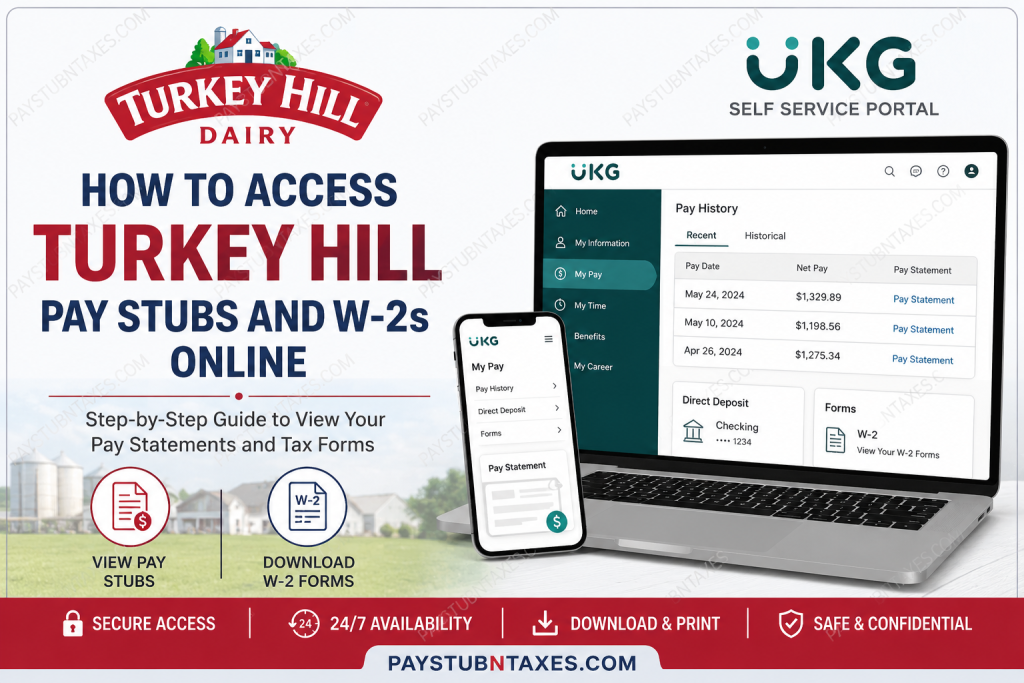
Located in the heart of Lancaster County, Pennsylvania, Turkey Hill Dairy has grown into one of America’s most recognized dairy and beverage brands. Known for its premium ice cream and refrigerated iced tea products, the company serves customers across nearly every U.S. state and multiple international markets. Turkey Hill is equally respected for its employee-focused workplace culture, offering comprehensive benefits, retirement plans, paid time off, educational assistance, and wellness support programs. As a Turkey Hill Dairy employee, you can conveniently access your pay stubs, payroll records, and W-2 tax forms online through the UKG Self-Service Portal. The platform allows employees to securely review earnings, download tax documents, and manage payroll information from both desktop and mobile devices.
Turkey Hill UKG Self-Service Portal
Employees can log in using the official UKG portal below:
UKG Login Portal:
Turkey Hill UKG Self-Service Login
The system provides access to:
- Current and historical pay stubs
- W-2 tax forms
- Payroll history
- Direct deposit information
- Employee profile details
- Mobile payroll access
How to Access Turkey Hill Pay Stubs Online
Follow these simple steps to retrieve your pay statements online.
Step 1: Visit the UKG Portal
Open the official Turkey Hill UKG login page: https://g035105p01x.ukg.net/login.aspx
Enter your:
- Username
- Password
Then click Login.
Step 2: Navigate to “My Pay”
Once logged in:
- Open the navigation menu
- Select My Pay
- Click Pay History
The portal will display your most recent paycheck automatically.
Step 3: Open Your Pay Statement
To view or download your pay stub:
- Select the desired pay period
- Click Pay Statement
- Open the PDF version of your paycheck statement
You may:
- Download the file
- Print the document
- Save a digital copy for personal records
Step 4: View Historical Pay Stubs
The UKG system also allows employees to retrieve older pay records.
To access previous pay statements:
- Open the Historical tab
- Select a custom date range
- Click Pay Statement to generate the PDF file
This feature is particularly useful when applying for loans, housing, or employment verification.
How to Access Turkey Hill W-2s Forms Online
Employees can also retrieve year-end tax statements directly from UKG.
Step 1: Log in to UKG
Visit: Turkey Hill UKG Login Page
Enter your login credentials.
Step 2: Open the Payroll Section
After signing in:
- Open the navigation menu
- Select My Pay
- Click Forms
- Choose W-2
Step 3: Download Your W-2
If your W-2s form has been issued, it will appear in the system and can be downloaded instantly as a PDF document.
You can:
- Print the W-2
- Save it digitally
- Submit it to your tax preparer
Accessing Turkey Hill Pay Stubs Through the UKG Mobile App
Turkey Hill employees can also manage payroll information using the UKG Ready mobile application.
Download the UKG Ready App
Search for UKG Ready in:
- Apple App Store
- Google Play Store
Be sure to install the correct UKG Ready application.
Turkey Hill Company Short Name
During mobile registration, you will be asked to enter the company’s short name.
Turkey Hill Company Short Name:turkeyhill
Mobile App Registration Process
After installing the app:
- Open UKG Ready
- Select your region
- Enter the company’s short name
- Log in with your assigned username and password
- Complete two-factor authentication
- Set your security question
Once setup is complete, future logins only require your username and password.
How to View Pay Stubs in the UKG Mobile App
Inside the app:
- Tap the menu icon
- Select My Pay
- Choose Pay History
- Tap Pay Statement to open the PDF version of your paycheck
How to Access W-2 Forms in the UKG Mobile App
To retrieve your W-2:
- Tap the menu icon
- Open My Pay
- Select Forms
- Tap W-2
If your W-2 is available, the document will open for viewing and download.
Turkey Hill Employee Benefits
Turkey Hill Dairy offers an extensive employee benefits package designed to support financial wellness, health, and work-life balance.
Eligible employees may receive access to:
- Medical, dental, and vision insurance
- Prescription coverage
- 401(k) retirement plan with company match
- Life insurance
- Disability coverage
- Paid vacation and holidays
- Educational assistance reimbursement
- Employee Assistance Program (EAP)
- Company bonus plans
- Shift differentials
- Company-paid uniforms
- Free workplace products
These benefits help Turkey Hill maintain its reputation as a supportive and employee-centered workplace.
Troubleshooting Turkey Hill UKG Login Issues
If you experience login problems:
Forgot Password
Use the Forgot Password option available on the UKG login screen.
Account Locked
Too many failed login attempts may temporarily lock your account. Wait several minutes and try again, or contact HR support.
Browser Compatibility
For best performance, use:
- Google Chrome
- Microsoft Edge
- Mozilla Firefox
- Safari
Mobile Verification Problems
Ensure your:
- Email address is current
- Phone number is updated
- Two-factor authentication settings are active
Turkey Hill Human Resources Contact Information
If you need payroll or W-2 assistance, contact Turkey Hill Human Resources directly:
Turkey Hill Dairy – Human Resources
2601 River Road
Conestoga, PA 17516
Fax: 717-872-0602
Email: careers@turkeyhill.com
Final Thoughts
Turkey Hill Dairy employees can securely access pay stubs and W-2 forms anytime through the UKG Self-Service portal or UKG Ready mobile app. Whether you need recent paycheck information, historical payroll records, or year-end tax forms, the system provides a convenient and user-friendly payroll experience. By using the UKG platform, employees can efficiently manage their payroll documents, monitor earnings, and maintain digital access to important employment records throughout the year.
FAQ – Turkey Hill Pay Stubs and W-2s
1. How do I access my Turkey Hill pay stubs online?
You can log into the UKG Self-Service portal and navigate to “My Pay” → “Pay History” to access your paycheck statements.
2. What website does Turkey Hill use for employee payroll?
Turkey Hill uses the UKG Self-Service platform for payroll and employee pay records.
3. How do I download my Turkey Hill W-2 form?
After logging into UKG, go to “My Pay,” select “Forms,” and click “W-2” to download the document.
4. What is the Turkey Hill UKG login link?
The official login portal is: https://g035105p01x.ukg.net/login.aspx
5. What is the company’s short name for Turkey Hill in the UKG app?
The company’s short name is: turkeyhill
6. Can former Turkey Hill employees access W-2 forms online?
Yes. Former employees may still access W-2 documents through the UKG portal if their account remains active.
7. How do I reset my UKG password?
Use the “Forgot Password” option on the UKG login page to reset your password securely.
8. Can I access Turkey Hill pay stubs on my phone?
Yes. Employees can use the UKG Ready mobile application to view and download pay statements.
9. When are Turkey Hill W-2 forms available?
W-2 forms are typically issued by the end of January each year.
10. Can I print my Turkey Hill pay stubs?
Yes. UKG allows employees to print or download PDF copies of pay statements.
11. What should I do if my UKG account is locked?
Wait a few minutes and try again, or contact Turkey Hill Human Resources for assistance.
12. Does Turkey Hill offer direct deposit?
Yes. Employees can manage direct deposit information directly through the UKG platform.
13. Can I view previous pay statements in UKG?
Yes. The “Historical” tab in Pay History allows access to older paycheck records.
14. Who do I contact for payroll assistance at Turkey Hill?
Employees can contact Turkey Hill Human Resources for payroll or W-2 support.
15. Does Turkey Hill offer employee benefits?
Yes. Turkey Hill offers medical insurance, retirement plans, paid holidays, life insurance, disability coverage, educational assistance, and additional employee benefits.

