
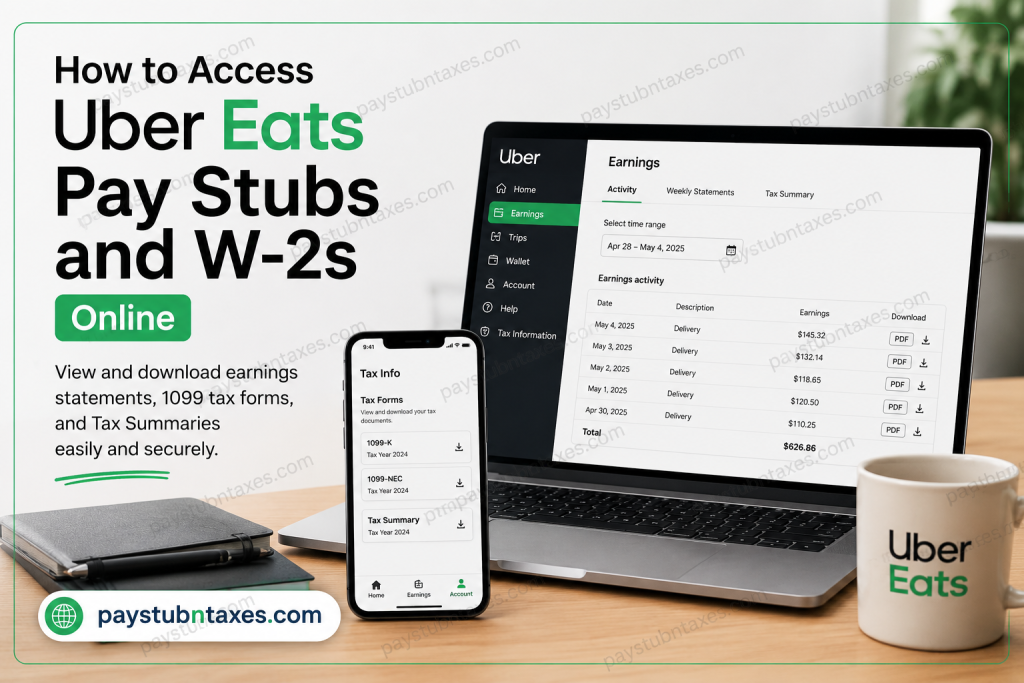
Uber Eats has become one of the world’s leading online food delivery services, connecting millions of customers with restaurants and delivery couriers across multiple countries. Since its launch in 2014, the platform has expanded rapidly and now competes with major delivery services such as DoorDash, Grubhub, and Deliveroo. Unlike traditional employees, Uber Eats drivers and couriers operate as independent contractors. As a result, Uber does not provide conventional employee pay stubs or W-2 forms. Instead, drivers can access Proof of Earnings, Weekly Statements, Tax Summaries, and 1099 tax documents directly through the Uber Driver dashboard or mobile app. This comprehensive guide explains how to download Uber Eats earnings statements, retrieve tax documents, and understand the difference between W-2 and 1099 forms.
Does Uber Eats Provide Pay Stubs?
Uber Eats does not issue traditional payroll pay stubs because drivers are self-employed independent contractors rather than employees. However, Uber provides official earnings statements and weekly invoices that can serve as proof of income for:
- Apartment applications
- Mortgage or loan verification
- Immigration documentation
- Tax preparation
- Income verification for financial institutions
Drivers can generate and download these documents directly from the Uber Driver Portal.
How to Access Uber Eats Earnings Statements Online
Method 1: Download Earnings Statements from the Uber Driver Dashboard
Follow these steps to access your Uber Eats earnings activity online:
- Visit the official Uber Driver Portal: Uber Driver Dashboard
- Sign in using your Uber driver email address and password.
- Navigate to Earnings.
- Click the Activity tab.
- Select your preferred timeframe or pay period.
- Locate the Download column.
- Click the PDF button to download your earnings statement or invoice.
These downloadable statements typically include:
- Trip earnings
- Delivery earnings
- Promotions and bonuses
- Tips
- Uber service fees
- Weekly totals
- Tax-related information
Method 2: Download Weekly Statements
Uber also provides weekly summary statements for drivers.
Steps:
- Log in to the Uber Driver Dashboard.
- Open the Earnings section.
- Select the Weekly Statements tab.
- Click the PDF icon next to the desired statement.
Weekly statements can be useful for maintaining organized financial records throughout the year.
How to Set Up Your Uber Tax Profile
Before downloading invoices or tax-related documents, you should ensure your tax profile is configured correctly.
Steps to Configure Tax Settings
- Log in at: Uber Drivers Portal
- Navigate to Tax Settings.
- Enter all required tax information accurately.
- Submit the form for verification.
Uber notes that tax authorities may verify the information you provide, so accuracy is essential.
Does Uber Eats Issue W-2 Forms?
No. Uber Eats drivers do not receive W-2 forms because they are not classified as employees.
Instead, Uber issues the following tax documents:
- 1099-K
- 1099-NEC
- Annual Tax Summary
Understanding Uber Eats 1099 Forms
What Is a 1099-K?
A 1099-K reports payment transactions processed through Uber’s platform.
According to Uber, drivers may receive a 1099-K if they:
- Earned more than $20,000 in unadjusted earnings
- Completed more than 200 transactions during the tax year
However, Uber may still provide the form even if federal thresholds are not met.
What Is a 1099-NEC?
A 1099-NEC reports non-driving compensation such as:
- Referral bonuses
- Promotions
- Incentives
Drivers typically receive this form if these payments total $600 or more annually.
How to Access Uber Eats 1099 Tax Forms
Through the Uber Driver App
- Open the Uber Driver app.
- Go to Account.
- Select Tax Info.
- Tap Tax Forms.
Through the Uber Driver Dashboard
- Log in to the Uber Driver Portal.
- Click Tax Information.
- Select Download next to your available forms.
Uber generally makes tax forms available by January 31 each year.
What If You Do Not Qualify for a 1099?
Even if you do not meet the IRS reporting threshold, Uber still provides an annual Tax Summary document.
The Tax Summary includes:
- Gross earnings
- Uber fees
- Commissions
- Promotions
- Mileage information
- Tax-deductible expenses
This document is extremely useful when filing taxes as an independent contractor.
Why Your Uber 1099 Amount May Not Match Your Bank Deposits
Many drivers notice that their 1099 earnings appear higher than their actual bank deposits.
This happens because Uber reports gross transaction amounts before deducting:
- Uber commissions
- Service fees
- Booking fees
The Tax Summary helps break down these deductions for tax reporting purposes.
Common Uber Eats Tax Deductions
Independent contractors may qualify for business-related tax deductions, including:
- Mileage
- Vehicle maintenance
- Fuel expenses
- Phone expenses
- Tolls and parking
- Uber service fees
- Insurance costs
Uber’s Tax Summary often provides mileage and fee details that simplify tax preparation.
Troubleshooting Uber Earnings Statement Issues
If you cannot access invoices or statements:
- Verify your tax profile information.
- Ensure your legal name matches IRS records.
- Update your Tax Settings if necessary.
- Try accessing the dashboard from a desktop browser.
Final Thoughts
Uber Eats makes it relatively simple for drivers and couriers to access earnings records and tax documents online. Although the platform does not issue traditional pay stubs or W-2 forms, drivers can quickly download weekly earnings statements, invoices, Tax Summaries, and 1099 forms through the Uber Driver app or web portal. Maintaining accurate records throughout the year is essential for tax compliance, loan applications, and personal financial management. By understanding how Uber’s contractor payment system works, drivers can stay organized and prepared during tax season.
Frequently Asked Questions
1. Can Uber Eats earnings statements be used as proof of income?
Yes. Uber earnings statements and weekly summaries are commonly accepted as proof of self-employment income.
2. When are Uber tax forms available?
Uber generally releases tax forms by January 31 each year.
3. Does Uber mail physical tax documents?
Yes. Drivers who opt for paper delivery may receive mailed tax documents shortly after February 1.
4. Can I access previous years’ Uber tax documents?
Yes. Previous tax forms and statements are usually available through the Uber Driver Dashboard under the Tax Information section.
Why didn’t I receive a W-2 from Uber Eats?
Uber Eats classifies drivers as independent contractors, not employees. Therefore, drivers receive 1099 forms instead of W-2 forms.

