
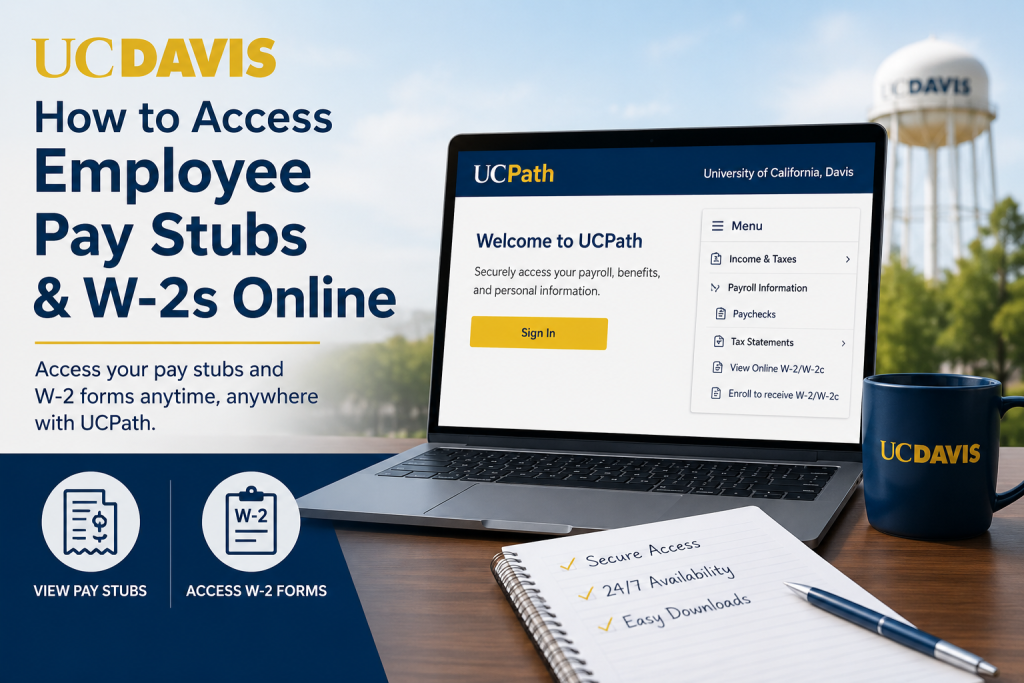
As one of the nation’s leading public research universities, University of California, Davis provides employees with secure online access to payroll and tax records through the UCPath self-service portal. Whether you need to review recent earnings, download past paychecks, or retrieve your annual W-2 tax statement, UCPath makes the process simple and efficient. Current employees can conveniently access electronic pay stubs and W-2/W-2c forms anytime using their UC Davis Single Sign-On credentials and Multi-Factor Authentication (MFA).
UC Davis Payroll Portal
Employees can access payroll and tax documents through the official UCPath portal:
Portal: http://ucpath.universityofcalifornia.edu/
After opening the website, select University of California, Davis from the campus options and sign in using your UC Davis credentials.
What You Can Access Through UCPath
The UCPath system allows employees to:
- View and download pay stubs
- Access annual W-2 and corrected W-2c forms
- Enroll in paperless W-2 delivery
- Review payroll history
- Update payroll-related information
- Access tax statements securely online
How to Log in to UCPath at UC Davis
To securely access your payroll records, follow these steps:
- Visit the UCPath portal
- Choose University of California, Davis
- Enter your UC Davis Single Sign-On username and passphrase
- Complete Multi-Factor Authentication (MFA)
- Access your employee dashboard
UC Davis uses Central Authentication Service (CAS) for secure login protection and advises employees never to share their passphrase through email or phone requests.
How to Access UC Davis Pay Stubs Online
Once logged into UCPath, use the following navigation path:
Pay Stub Navigation
Menu → Income & Taxes → Payroll Information → Paychecks
From there, employees can:
- View current and previous paychecks
- Download PDF earnings statements
- Print payroll records for loans, taxes, or employment verification
- Review deductions, taxes, and direct deposit details
The UCPath payroll section centralizes all paycheck records in one secure location.
How to Access UC Davis W-2 Forms Online
Employees can retrieve annual W-2 tax forms directly through UCPath.
W-2 Navigation
Menu → Income & Taxes → Tax Statements → View Online W-2/W-2c
Once selected, employees can:
- Download digital W-2 copies
- Print tax forms instantly
- Access corrected W-2c forms when available
- Retrieve multiple tax-year statements
UC Davis encourages employees to receive W-2 tax forms electronically for faster and more secure delivery.
How to Enroll in Paperless W-2 Delivery
Employees may opt into electronic W-2 delivery directly inside UCPath.
Navigation
Menu → Income & Taxes → Tax Statements → Enroll to receive W-2/W-2c
To activate paperless delivery:
- Open the W-2/W-2c enrollment page
- Select the consent checkbox
- Click Submit
Employees can also withdraw electronic consent at any time within the same section.
Accessing Older W-2 Forms
UC Davis employees can retrieve older tax records depending on the tax year.
Tax Year 2020 to Current
Use UCPath to access W-2 forms.
Tax Years 2005 to September 2019
Use the AYSO system with your username and password.
If login assistance is needed for AYSO, employees may contact the university payroll support team for account recovery assistance.
Multi-Factor Authentication (MFA) Requirements
UCPath requires enhanced login security using Multi-Factor Authentication.
Employees may be prompted to:
- Approve a Duo Push notification
- Verify login attempts through a mobile device
- Complete secure authentication before accessing payroll records
This additional security layer helps protect sensitive payroll and tax information from unauthorized access.
Troubleshooting UCPath Login Issues
If you cannot access UCPath, try the following:
- Verify your UC Davis Single Sign-On credentials
- Reset your campus password if necessary
- Confirm that Multi-Factor Authentication is active
- Clear browser cache and cookies
- Try another supported browser
- Ensure pop-ups are enabled for UCPath
For technical assistance, employees can contact:
- UCPath Center: 855-982-7284
- UC Davis IT Support: 530-754-HELP (4357)
Benefits of Accessing Pay Stubs and W-2s Online
Using UCPath online payroll services offers several advantages:
- 24/7 access to payroll records
- Faster W-2 delivery
- Reduced paper clutter
- Secure encrypted access
- Easy document downloads
- Convenient access from any location
Electronic payroll access also simplifies tax preparation and employment verification processes.
Final Thoughts
UC Davis employees can quickly and securely access pay stubs and W-2 tax forms online through the UCPath portal. With Single Sign-On authentication, Multi-Factor Authentication security, and paperless tax form options, UCPath provides a streamlined payroll experience for faculty, staff, and university employees. By following the navigation paths outlined above, employees can manage payroll records efficiently and retrieve important tax documents whenever needed.
Frequently Asked Questions (FAQ)
1. How do I access my UC Davis pay stubs online?
Log in to the UCPath portal, choose University of California, Davis, and navigate to: Menu → Income & Taxes → Payroll Information → Paychecks
2. Where can I download my UC Davis W-2 form?
You can download your W-2 through UCPath by going to: Menu → Income & Taxes → Tax Statements → View Online W-2/W-2c
3. What is the official UC Davis payroll portal?
The official payroll portal is: http://ucpath.universityofcalifornia.edu/
4. Do UC Davis employees use UCPath?
Yes. UC Davis employees use UCPath to access payroll, tax documents, direct deposit information, and employment records.
5. Can I print my pay stubs from UCPath?
Yes. Employees can download and print PDF copies of paychecks directly from the UCPath portal.
6. How do I sign in to UCPath?
Employees sign in using their UC Davis Single Sign-On credentials and complete Multi-Factor Authentication (MFA).
7. What should I do if I forget my UC Davis login password?
You should reset your UC Davis campus password or contact campus IT support for account recovery assistance.
8. Does UCPath require Multi-Factor Authentication?
Yes. UCPath uses Multi-Factor Authentication to help protect employee payroll and tax information.
9. Can I access old W-2 forms online?
Yes. Employees can access:
- Tax Year 2020 to current through UCPath
- Tax Years 2005 to September 2019 through the AYSO system
10. How do I enroll in paperless W-2 delivery?
In UCPath, go to: Menu → Income & Taxes → Tax Statements → Enroll to receive W-2/W-2c
Then select the consent checkbox and submit.
11. Can I withdraw paperless W-2 consent later?
Yes. Employees may withdraw electronic consent within the same W-2 enrollment section inside UCPath.
12. What information appears on UC Davis pay stubs?
Pay stubs typically include:
- Gross earnings
- Net pay
- Tax deductions
- Retirement contributions
- Leave balances
- Direct deposit information
13. Is UCPath available outside the campus network?
Yes. Employees can securely access UCPath remotely using internet access and MFA verification.
14. Who should I contact for UCPath support?
Employees can contact:
- UCPath Center: 855-982-7284
- UC Davis IT Support: 530-754-HELP (4357)
15. Why should I use electronic W-2 delivery?
Electronic W-2 delivery offers:
- Faster access to tax forms
- Secure online delivery
- Reduced paper clutter
- Convenient downloads anytime
- Easier tax preparation

