
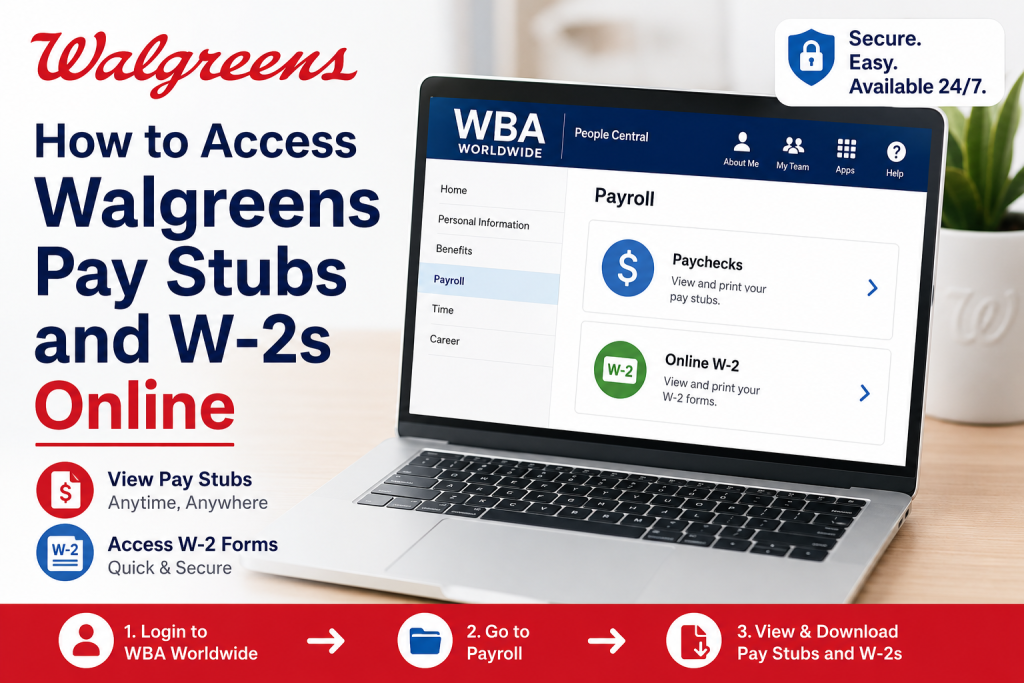
Walgreens is one of the largest pharmacy retail chains in the United States, operating thousands of stores and employing hundreds of thousands of team members nationwide. Employees can conveniently access payroll records, tax forms, and HR services through the Walgreens Boots Alliance self-service system known as WBA Worldwide. If you are an active Walgreens employee and need to view your pay stubs, download W-2 forms, or manage payroll information online, this complete guide explains every step clearly and professionally.
Walgreens Employee Payroll Portal
Walgreens employees use the official WBA Worldwide portal to access payroll and tax information online.
Official Portal Link
Website: https://wbaworldwide.wba.com
The portal allows employees to:
- View and download pay stubs
- Access W-2 tax forms
- Manage payroll settings
- Update employee information
- Use People Central HR services
- Access tax election options
The system is secured through Walgreens OneID authentication and multi-factor verification.
What Is WBA Worldwide?
WBA Worldwide is the official employee platform for Walgreens Boots Alliance team members. Within the portal, employees can access People Central, the payroll and HR section used for paychecks, tax forms, and benefits.
Employees commonly refer to the system as:
- WBA Worldwide
- People Central
- Walgreens Employee Portal
- Walgreens Payroll Portal
- myHR Walgreens
How to Access Walgreens Pay Stubs Online
Follow these steps carefully to access your Walgreens paycheck statements online.
Step 1: Visit the Walgreens Employee Portal
Go to:
You may first see the WBA Worldwide work location screen. Select your work location and continue.
Step 2: Sign In Using OneID
Enter your:
- Walgreens OneID
- Password
Then click Sign On.
If you forgot your password, use the Forgot Password option available on the login page.
Step 3: Open People Central
After logging in:
- Click About Me
- Select Payroll
- Choose Paychecks
This section contains your current and previous paycheck statements.
Step 4: View Your Pay Stub
Inside the Paychecks section:
- Select the desired pay period
- Open the paycheck statement
- Review earnings, deductions, taxes, and net pay
Step 5: Download or Print Your Pay Stub
You can:
- Download the pay stub as a PDF
- Print a physical copy
- Save copies for tax or income verification purposes
Walgreens employees often use pay stubs for:
- Apartment applications
- Loan approvals
- Tax filing
- Employment verification
How to Access Walgreens W-2 Forms Online
Walgreens employees can also retrieve annual tax forms digitally through the payroll portal.
Steps to Access Your W-2
- Log in to WBA Worldwide
- Open People Central
- Go to Payroll
- Select Online W-2
- Choose the tax year
- Download or print your W-2 form
Important 2024 W-2 Enrollment Notice
Walgreens requires employees to enroll in electronic W-2 delivery before the official deadline.
According to Walgreens payroll instructions:
- Employees needed to enroll by 6 PM CST on January 5, 2025
- Employees already enrolled previously do not need to reenroll
- Paper W-2 forms are mailed by February 1 if online enrollment is not completed
To enable electronic W-2 delivery:
- Open People Central
- Select My Profile
- Click Payroll
- Choose Online W-2
- Open W-2 Election
- Select Election Details
- Click Receive W-2 Online
- Confirm your election
Walgreens Two-Step Verification Setup
Walgreens uses advanced multi-factor authentication (MFA) to protect employee accounts.
Employees may need to set up:
- PingID Mobile App
- Passkeys
- Biometric Authentication
- SMS Verification
- Phone Verification
To configure authentication:
- Visit https://mypassport.walgreens.com
- Log in with OneID
- Open the Two-Step Verification section
- Add a verification method
Walgreens recommends using phish-resistant methods such as:
- PingID Push Notifications
- Passkeys
- Biometric Authentication
How Former Walgreens Employees Can Get Pay Stubs and W-2s
Former Walgreens employees usually retain portal access for approximately 45 days after separation.
After access expires, former employees may contact Walgreens HR.
HR Contact Information
HR General Support
Phone: 1-800-825-5467
Former Employee Support
Phone: 1-866-967-5492
Payroll Department
Phone: 1-847-527-5370
Email Support
Email: askhr@walgreens.com
Email: W2Taxing@walgreens.com
When requesting payroll records, provide:
- Full legal name
- Employee ID
- Last four digits of SSN
- Dates of employment
- Tax year requested
Troubleshooting Walgreens Login Problems
Forgot Password
Use the “Forgot Password” option on the login page.
Incorrect Credentials
Verify your OneID carefully. Contact HR if the issue continues.
Browser Issues
Try:
- Clearing cache and cookies
- Using Chrome or Safari
- Opening an Incognito window
Account Not Activated
New employees may need account activation assistance from their manager.
Benefits of Accessing Walgreens Pay Stubs Online
Using the Walgreens payroll portal offers several advantages:
- 24/7 payroll access
- Faster W-2 retrieval
- Secure document storage
- Easy printing and downloads
- Convenient tax preparation
- Mobile-friendly access
Final Thoughts
Walgreens has streamlined payroll and tax document access through the secure WBA Worldwide employee portal. Whether you need current paycheck records, tax documents, or payroll settings, the online system provides fast and convenient access from virtually anywhere. Employees should also enable electronic W-2 delivery and two-step verification for enhanced security and faster tax processing. For former employees, Walgreens HR support remains available for retrieving historical pay stubs and W-2 forms when portal access expires. By understanding how the Walgreens payroll system works, employees can manage their financial records more efficiently and avoid unnecessary delays during tax season.
FAQs About Walgreens Pay Stubs and W-2s
1. What is the Walgreens employee payroll portal?
The Walgreens payroll portal is the WBA Worldwide self-service platform where employees can access pay stubs, W-2s, payroll records, and HR information online.
2. What is the official Walgreens employee login website?
The official Walgreens employee portal is:
https://wbaworldwide.wba.com
3. How do I log in to Walgreens payroll?
Visit the WBA Worldwide portal, select your work location, enter your OneID and password, then click “Sign On.”
4. Where can I find Walgreens pay stubs online?
After logging in, go to:
About Me > Payroll > Paychecks
You can then view, download, or print your paycheck statements.
5. How do I access my Walgreens W-2 online?
Log in to WBA Worldwide and navigate to:
Payroll > Online W-2
Select the desired tax year to download your W-2 form.
6. Can former Walgreens employees access pay stubs?
Yes. Former employees usually retain portal access for approximately 45 days after leaving Walgreens.
7. How can former employees request Walgreens W-2 forms?
Former employees can email:
askhr@walgreens.com
or contact Walgreens HR support for W-2 assistance.
8. What information is needed to request a Walgreens W-2?
You may need to provide:
- Full legal name
- Employee ID
- Last four digits of SSN
- Dates of employment
- Requested tax year
9. What should I do if I forgot my Walgreens password?
Use the “Forgot Password” option on the Walgreens login page or visit MyPassport for password recovery.
10. Does Walgreens use two-step verification?
Yes. Walgreens uses multi-factor authentication through PingID, passkeys, biometric authentication, SMS, or phone verification for enhanced security.
11. How do I enroll in electronic W-2 delivery at Walgreens?
Go to:
People Central > My Profile > Payroll > Online W-2 > W-2 Election
Then select “Receive W-2 Online” and confirm your election.
12. When are Walgreens W-2 forms available?
Electronic W-2 forms are generally available in January each year before tax filing season begins.
13. Can I print Walgreens pay stubs?
Yes. Employees can download paycheck statements as PDF files and print copies for tax, loan, or income verification purposes.
14. What devices support the Walgreens employee portal?
The Walgreens payroll portal works on desktops, laptops, tablets, and mobile devices with internet access.
15. Who do I contact for Walgreens payroll support?
Employees can contact Walgreens HR or payroll support through:
- HR Support: 1-800-825-5467
- Former Employee Line: 1-866-967-5492
- Payroll Department: 1-847-527-5370

