
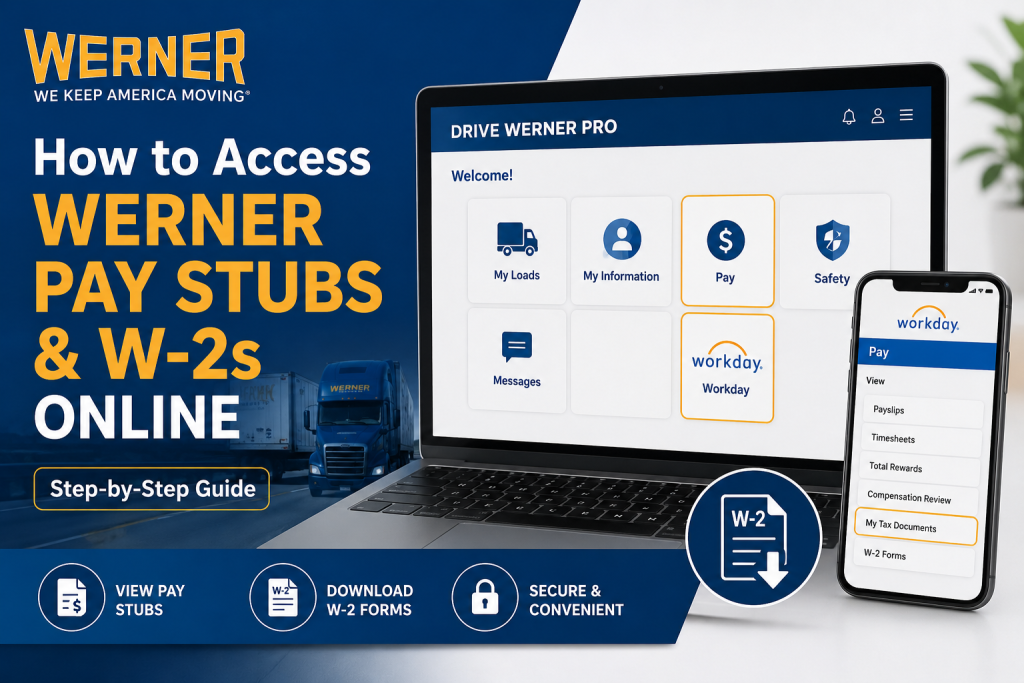
Werner Enterprises is one of North America’s leading transportation and logistics companies, providing freight, supply chain, and logistics services throughout the United States, Canada, and Mexico. Founded in 1956 and headquartered in Omaha, Nebraska, Werner has grown into one of the largest truckload carriers in the United States, serving customers through advanced transportation technology and innovative logistics solutions. If you are a Werner driver or employee, you can conveniently access your pay stubs, payroll information, and year-end W-2 tax forms online through the Drive Werner Pro and Workday platforms. This guide explains the complete process step by step.
Werner Employee Payroll Portal
Werner employees and drivers can access payroll documents online using:
- Drive Werner Pro Portal
- Workday Payroll System
Official Login Links
- Drive Werner Pro:
Drive Werner Pro Login
How to Log in to Drive Werner Pro
To access your payroll and tax information, you must first sign in to the Drive Werner Pro portal.
Login Credentials
Use the same login information that you use for the Edge Connect tablet:
- Username: Your Employee Number
- Password:
Werner123xxx!- Replace “xxx” with the last three digits of your driver’s license number.
- Do not forget the exclamation mark (!).
Example: If the last three digits of your driver’s license are 789, your password would be:Werner123789!
Important Login Notice
Werner employees cannot use the Edge Connect Tablet to access pay stubs, W-2s, or benefits enrollment.
You must log in using:
- A personal computer
- A smartphone or tablet browser
- A terminal computer
How to Access Werner Pay Stubs Online
After successfully signing in to Drive Werner Pro, follow these steps:
- Open the Drive Werner Pro Dashboard
- Click on the Pay Tile
- Select the desired pay period
- Open or download your pay statement
- Print or save the PDF copy for your records
Your recent payroll statements, earnings details, deductions, reimbursements, and direct deposit information will be available there.
How to Access Werner W-2 Forms Online
Werner employees can retrieve year-end tax forms through the Workday system integrated inside Drive Werner Pro.
Step-by-Step Instructions
Step 1: Log into Drive Werner Pro
Visit:
Drive Werner Pro Portal at https://dwp.werner.com/login
Enter your employee credentials.
Step 2: Open the Workday Tile
Once logged in:
- Locate the Workday Tile
- Click it from the dashboard
- Enter the same payroll PIN when prompted
The Workday homepage will open afterward.
Step 3: Navigate to Pay Section
Inside Workday:
- Open the Menu
- Select Pay
- Click My Tax Documents
Step 4: Download Your W-2
Inside the My Tax Documents section:
- Choose the applicable tax year
- Click View/Print
- Download the PDF copy of your W-2 form
If the form is still processing, you may temporarily see a “Notify Me Later” message before the document becomes available.
Features of the Werner Workday Payroll System
Werner uses Workday Payroll technology, which allows employees to securely manage payroll and tax information online.
Employees can:
- View online pay stubs
- Access W-2 and W-2C forms
- Update tax withholding elections
- Manage direct deposit details
- Opt into paperless payroll
- Access payroll records through mobile devices
Common Problems and Solutions
Forgot Password
If you forget your password:
- Verify the last three digits of your driver’s license
- Ensure the exclamation mark is included
- Contact Werner Benefits or HR support if needed
Unable to Access Workday
Make sure:
- You are using a browser instead of the Edge Connect tablet
- Your employee number is entered correctly
- Your payroll PIN is accurate
W-2 Not Available Yet
W-2 forms are typically issued by late January each year. If your tax form is unavailable:
- Wait until payroll processing completes
- Check the Workday notifications area
- Contact Werner Benefits for assistance
Werner Employee Benefits and Payroll Support
If you experience issues accessing your pay stubs or W-2 forms, contact Werner Benefits directly.
Werner Benefits Contact Information
- Phone: 877-856-7711
- Fax: 402-894-3029
- Email: benefits@werner.com
Why Werner Employees Prefer Online Payroll Access
Online payroll access provides several advantages:
- Instant access to earnings statements
- Secure retrieval of W-2 forms
- Faster tax filing preparation
- Mobile-friendly payroll management
- Reduced paper clutter
- Easy access to historical payroll records
Werner’s technology-driven employee systems reflect the company’s broader commitment to innovation and operational efficiency across the transportation industry.
Final Thoughts
Werner Enterprises has streamlined employee payroll management through Drive Werner Pro and Workday. Whether you need your latest pay stub, payroll history, or annual W-2 tax form, the process is fast, secure, and accessible online from virtually anywhere. By using your employee credentials and following the steps outlined above, you can easily manage your payroll records without needing paper copies or in-person HR assistance.
Frequently Asked Questions (FAQ)
1. How do I access Werner Enterprises’ pay stubs online?
Log in to Drive Werner Pro at: https://dwp.werner.com/login
After logging in, click the Pay Tile to view and download your pay statements.
2. What username do I use for Drive Werner Pro?
Your username is your Werner Employee Number.
3. What is the default Werner password format?
The password format is:
Werner123xxx!
Replace “xxx” with the last three digits of your driver’s license number.
4. Can I use the Edge Connect Tablet to view pay stubs?
No, Werner employees cannot use the Edge Connect Tablet to access pay stubs or W-2 forms. Use a personal device or a terminal computer instead.
5. How do I access my Werner W-2 online?
After logging into Drive Werner Pro:
- Open the Workday Tile
- Enter your payroll PIN
- Select Pay
- Click My Tax Documents
- Download your W-2 form
6. Where are W-2 forms stored in Workday?
W-2 tax forms are stored inside the My Tax Documents section within Workday.
7. Can former Werner employees still access W-2 forms online?
Yes. Former employees may still be able to access Workday and retrieve W-2 forms if their account remains active.
8. What should I do if I forgot my Werner password?
Verify the last three digits of your driver’s license and ensure the exclamation mark is included. If login issues continue, contact Werner Benefits support.
9. How do I contact Werner Benefits?
You can contact Werner Benefits using the following:
- Phone: 877-856-7711
- Fax: 402-894-3029
- Email: benefits@werner.com
10. What payroll system does Werner Enterprises use?
Werner Enterprises uses Workday Payroll integrated with Drive Werner Pro.
11. Can I download and print my Werner pay stubs?
Yes. Pay statements are available as downloadable PDF files that can be printed or saved digitally.
12. When are Werner W-2 forms available?
W-2 forms are generally available by the end of January each year after payroll processing is completed.
13. Can I access Werner payroll records from my phone?
Yes. Employees can access Drive Werner Pro and Workday from a mobile browser on smartphones or tablets.
14. What information appears on Werner’s pay stubs?
Werner pay statements typically include:
- Gross pay
- Net pay
- Taxes withheld
- Deductions
- Reimbursements
- Direct deposit details
- Pay period dates
15. Is Werner Workday secure for payroll access?
Yes. Workday uses secure authentication and employee verification systems to protect payroll and tax information.

