
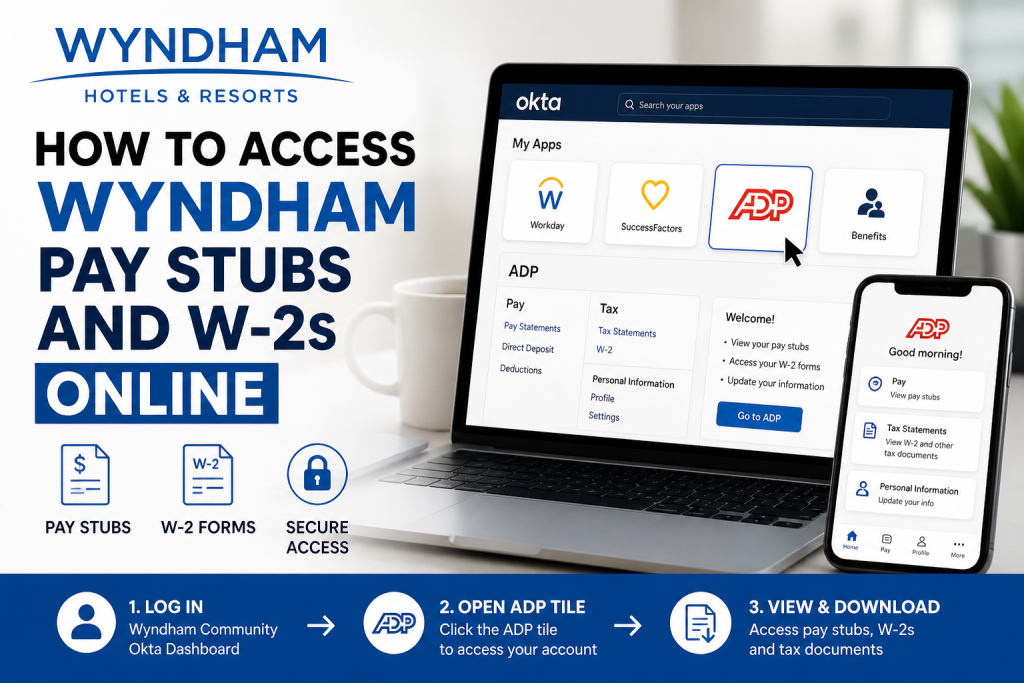
Managing payroll documents digitally has become essential for modern employees, and Wyndham Hotels & Resorts makes that process convenient through its secure ADP self-service system. Employees can quickly review payroll records, download tax documents, and manage personal payroll information online through the Wyndham Okta Dashboard and ADP portal. As one of the world’s largest hotel franchising companies, Wyndham operates thousands of hotels across more than 95 countries and manages a globally recognized portfolio of hospitality brands. This comprehensive guide explains how Wyndham employees can access pay stubs and W-2 forms online securely and efficiently.
Wyndham Payroll Portal Overview
Wyndham employees access payroll information through the Wyndham Community Okta Dashboard. Once signed in successfully, employees can launch ADP directly from the dashboard without needing a separate login every time.
Official Wyndham Payroll Access Link
Wyndham Community Login:
Wyndham Community Portal
After logging into the Wyndham Okta environment, an ADP tile appears on the home dashboard for payroll access.
What You Can Access Through ADP
The ADP self-service system allows Wyndham employees to securely manage important payroll and tax records, including:
- Current and historical pay stubs
- Annual W-2 tax statements
- Direct deposit information
- Payroll deductions
- Tax withholding details
- Personal payroll profile updates
- Mobile payroll access
The ADP platform also supports mobile access through the ADP Mobile Solutions application.
How to Access Wyndham Pay Stubs Online
Follow these simple steps to retrieve your payroll documents online.
Step 1: Visit the Wyndham Community Portal
Go to:
The portal uses secure Okta authentication for employee login.
Step 2: Enter Your Wyndham Credentials
Use your Wyndham Community username and password to sign in.
Important details from the Wyndham login page include:
- Your username is not your email address
- Two-factor authentication may be required
- If login issues occur, employees should contact Wyndham Community Support
Step 3: Open the ADP Tile
Once signed into the Okta Dashboard, locate the ADP tile on the homepage.
Clicking the tile automatically launches the ADP payroll environment where employees can access:
- Pay statements
- W-2 forms
- Tax documents
- Payroll settings
Step 4: Access Your Pay Stubs
Inside ADP:
- Navigate to the Pay section
- Select Pay Statements
- Choose the desired pay period
- View, download, or print your pay stub
Employees may also review deduction summaries, overtime details, and year-to-date earnings information.
How to Access Wyndham W-2 Forms Online
W-2 tax forms are typically available in ADP beginning in January each year.
To access your W-2:
- Log into the Wyndham Okta Dashboard
- Open the ADP application
- Navigate to the Tax Statements or W-2 section
- Select the appropriate tax year
- Download or print your W-2 form
Electronic access is generally faster than waiting for mailed copies.
How to Access Wyndham Payroll Information on Mobile
Employees can also access payroll records using the ADP Mobile Solutions app.
Download the ADP Mobile App
The tutorial explains that employees can download the ADP Mobile Solutions app from their smartphone app store.
Mobile Setup Steps
- Download the ADP Mobile Solutions app
- Open the application
- Sign in using your Wyndham-linked credentials
- Authenticate through Okta if prompted
- Access payroll records securely from your mobile device
First-Time ADP Registration Guide
Employees who have never used ADP may need to create an account.
According to the ADP registration tutorial:
- Visit the ADP portal
- Click Sign Up/Create Account
- Enter the employer registration code if provided
- Verify identity information exactly as it appears on payroll records
- Confirm contact details
- Create a secure password and security questions
Once registration is complete, employees can immediately begin accessing pay stubs and W-2 statements.
Troubleshooting Wyndham Payroll Login Issues
If you experience difficulty signing in, try the following solutions:
Forgot Password
Use the password recovery option available on the login page.
Verify Username Format
The Wyndham portal specifically notes that usernames are not email addresses.
Clear Browser Cache
Sometimes, outdated browser cookies prevent successful authentication.
Try Another Browser
Use updated versions of:
- Google Chrome
- Microsoft Edge
- Safari
Contact Wyndham Support
Wyndham Community Support Line: 1-855-849-3487 (Option 4)
Benefits of Online Payroll Access
Using Wyndham’s digital payroll system offers several advantages:
- 24/7 access to payroll records
- Faster W-2 delivery
- Secure tax document storage
- Mobile-friendly payroll management
- Reduced paperwork
- Instant download capability
Employees can retrieve historical payroll records anytime without contacting HR directly.
Final Thoughts
Wyndham’s integration with ADP and Okta creates a streamlined and secure payroll experience for employees. Whether you need your latest pay stub, prior payroll history, or annual W-2 tax documents, the online system makes access fast and convenient. By logging into the Wyndham Community portal and opening the ADP tile, employees can efficiently manage payroll records from virtually anywhere using either desktop or mobile devices.
Frequently Asked Questions (FAQ)
1. How do Wyndham employees access pay stubs online?
Wyndham employees can access pay stubs by signing into the Wyndham Community Portal and opening the ADP tile from the Okta dashboard.
2. What is the official Wyndham payroll portal?
The official payroll access portal is:
Wyndham Community Portal at https://myportal.wyndham.com
3. Does Wyndham use ADP for payroll?
Yes. Wyndham employees use the ADP self-service platform to access pay statements, W-2 forms, and payroll information.
4. Where can I find my Wyndham W-2 online?
After logging into ADP through the Wyndham Okta Dashboard, navigate to the Tax Statements or W-2 section to download your form.
5. Can former Wyndham employees access ADP?
Access availability may depend on Wyndham’s policies and account status. Former employees may need to contact HR or payroll support for assistance.
6. What should I do if I forgot my Wyndham login password?
Use the password recovery option on the Wyndham Community login page or contact Wyndham support for account assistance.
7. Why is my Wyndham username not working?
The Wyndham login page notes that your username is not your email address. Ensure you are using the correct Wyndham Community username.
8. Can I access Wyndham pay stubs on my phone?
Yes. Employees can use the ADP Mobile Solutions app to securely access payroll records and tax forms from mobile devices.
9. Is the ADP Mobile Solutions app free?
Yes. The ADP Mobile Solutions app is available as a free download for both Android and iPhone users.
10. When are Wyndham W-2 forms available?
W-2 forms are generally available electronically through ADP by late January each year.
11. Can I print my Wyndham pay stubs?
Yes. ADP allows employees to download and print current and historical pay statements.
12. What information is available in ADP?
Employees can view:
- Pay stubs
- W-2 forms
- Direct deposit details
- Payroll deductions
- Tax withholding information
- Year-to-date earnings
13. Does Wyndham use Okta authentication?
Yes. Wyndham uses Okta secure authentication to provide access to internal systems, including ADP payroll services.
14. What browser works best for Wyndham payroll access?
Updated versions of Google Chrome, Microsoft Edge, Safari, and Firefox generally work best for accessing Wyndham payroll systems.
15. How can I contact Wyndham support for payroll login problems?
Employees experiencing login issues should contact the Wyndham Community Support team or speak with their property’s HR department for assistance.

