
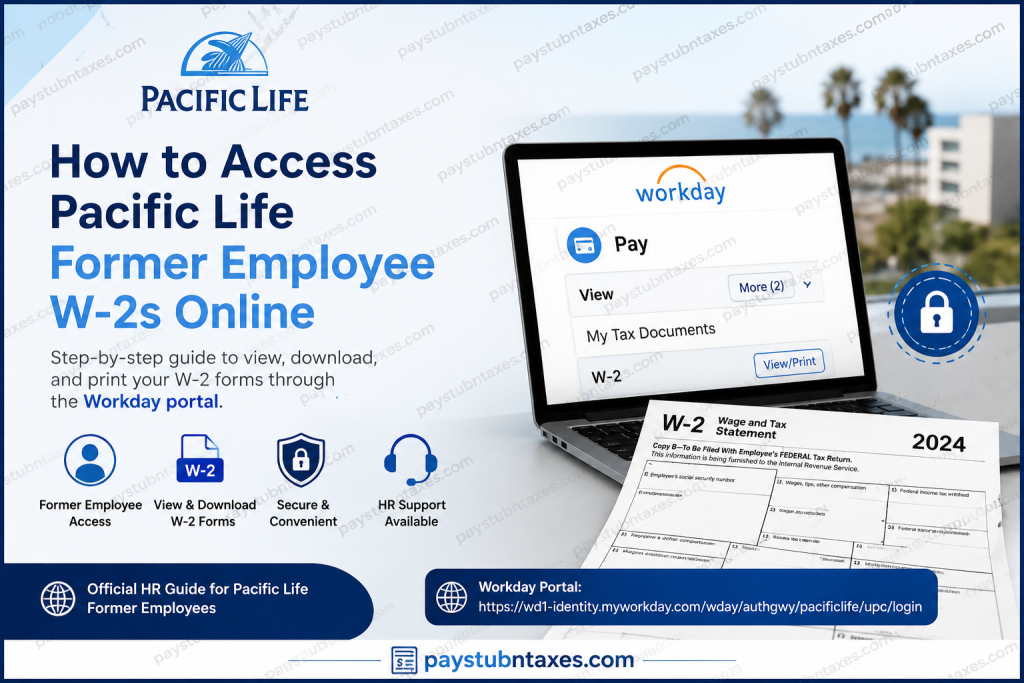
Former employees of Pacific Life can conveniently access and download their W-2 tax forms online through the company’s Workday self-service portal. Whether you need your W-2 to file federal and state income taxes, verify earnings, or maintain personal financial records, Pacific Life provides a secure digital platform that allows eligible former employees to retrieve tax documents without contacting payroll for every request. As one of the nation’s leading providers of life insurance, annuities, mutual funds, workforce benefits, and reinsurance solutions, Pacific Life has spent nearly 160 years helping individuals and businesses achieve long-term financial security. Headquartered in Newport Beach, California, the company continues to invest in modern HR technology that simplifies employee and former employee access to payroll and tax records.
Can Former Pacific Life Employees Access W-2 Forms Online?
Yes. Former Pacific Life employees can access their W-2 forms online through the Workday self-service portal, provided they retained the login credentials issued during the offboarding process.
Unlike active employees, terminated employees generally access Workday through a dedicated former employee login page rather than the company’s internal single sign-on system. Once logged in, users can view, download, and print available W-2 tax statements directly from the portal.
Pacific Life Former Employee W-2 Login Portal
Former employees can access their tax documents through the Workday portal:
Workday Former Employee Login:
https://wd1-identity.myworkday.com/wday/authgwy/pacificlife/upc/login?redirect=n
To sign in successfully, you will need:
- Former employee Workday username
- Password provided during offboarding
- Internet-connected computer or web browser
It is advisable to store these credentials in a secure location because they may be required for future tax years.
How to Access Your Pacific Life W-2 Online
Follow these steps to locate and download your W-2 form:
Step 1: Sign In to Workday
Visit the Pacific Life former employee Workday portal and enter your username and password.
Step 2: Open the Pay Section
After signing in, navigate to the Workday dashboard and select Pay from the available applications.
Step 3: Expand Additional Options
Within the Pay section, locate the View panel and click More to display additional payroll-related options.
Step 4: Select My Tax Documents
Choose My Tax Documents to access available tax records, including:
- W-2 forms
- Corrected W-2C forms (if applicable)
- Historical tax documents
Step 5: View and Download Your W-2
Locate the desired tax year and click View/Print.
You may then:
- View your W-2 online
- Download a PDF copy
- Print a paper copy for tax filing purposes
If a corrected W-2C has been issued, be sure to download and retain all related forms for accurate reporting.
Can You Access Your W-2 Through the Workday Mobile App?
No. Pacific Life former employees cannot access W-2 forms through the Workday mobile application after termination.
Mobile access restrictions are common once an employee leaves the organization because company-managed authentication methods and mobile permissions are typically revoked during the separation process.
To retrieve your W-2, you must log in through the designated web-based Workday portal using your former employee credentials.
What If You Forgot Your Workday Login Information?
If you no longer have access to your former employee credentials or encounter login difficulties, contact Pacific Life Human Resources for assistance.
Pacific Life HR Contact Information
Email: AskHR@pacificlife.com
Phone: 1-800-800-7646
HR representatives can help verify your identity, provide guidance regarding tax document access, and explain alternative methods for obtaining your W-2 if online access is unavailable.
When Are Pacific Life W-2 Forms Available?
Employers are generally required by federal law to furnish W-2 forms by January 31 each year.
Pacific Life typically makes electronic tax documents available through Workday once annual payroll processing has been completed. Former employees are encouraged to monitor their accounts beginning in late January for newly released forms.
Benefits of Accessing Your W-2 Online
Obtaining your W-2 electronically offers several advantages:
Faster Access
Tax forms become available immediately upon release without waiting for postal delivery.
Secure Document Storage
Workday provides encrypted access to sensitive payroll information.
Easy Reprinting
Lost or misplaced tax forms can be downloaded and printed again whenever needed.
Reduced Paper Clutter
Digital copies simplify recordkeeping while supporting environmentally responsible practices.
Troubleshooting Common W-2 Access Issues
Incorrect Username or Password
Verify that you are using the credentials supplied during your offboarding process. If necessary, contact HR for assistance.
Locked Account
Multiple unsuccessful login attempts may temporarily lock your account. Human Resources can help restore access.
Missing Tax Document
If your W-2 does not appear under My Tax Documents, confirm that you are viewing the correct tax year and contact HR if the issue persists.
Browser Problems
Clear your browser cache and cookies or try a different browser to resolve display or authentication issues.
Protecting Your Tax Information
Because W-2 forms contain highly sensitive personal and financial data, former employees should:
- Use secure, private internet connections
- Avoid public computers whenever possible
- Download documents only to trusted devices
- Log out of Workday after each session
- Store printed copies in a secure location
These precautions help safeguard your personal information against unauthorized access.
Final Thoughts
Accessing your Pacific Life former employee W-2 online is a straightforward process thanks to the company’s Workday self-service platform. By signing in with the credentials provided during offboarding, former employees can quickly locate, download, and print tax documents from the Pay section under My Tax Documents. Should any complications arise, Pacific Life’s HR team remains available to provide support and ensure that you receive the records necessary to complete your tax obligations accurately and on time.
FAQ: Pacific Life Former Employee W-2 Access
1. How can I access my Pacific Life W-2 online after leaving the company?
You can access your W-2 through the Pacific Life Workday former employee portal using the credentials provided during your offboarding process.
2. What website do former employees use to retrieve W-2 forms?
Former employees must log in through the dedicated Pacific Life Workday former employee portal.
3. Can I download and print my W-2 from Workday?
Yes. Workday allows you to view, download, save, and print your W-2 tax forms.
4. Do I need special credentials to access my W-2?
Yes. You must use the Workday username and password provided when your employment ended.
5. Can I access my Pacific Life W-2 through the Workday mobile app?
No. Former employees cannot access W-2 forms through the Workday mobile application after termination.
6. Where can I find my W-2 after logging into Workday?
Navigate to Pay, click More, and then select My Tax Documents to view available tax forms.
7. What if I forgot my Workday username or password?
Contact Pacific Life Human Resources for assistance with account recovery and login support.
8. How do I contact Pacific Life HR regarding W-2 issues?
You can email AskHR@pacificlife.com or call 1-800-800-7646 for assistance.
9. When are Pacific Life W-2 forms typically available?
W-2 forms are generally available by the end of January each year after annual payroll processing is completed.
10. Can I access W-2 forms from previous tax years?
Yes. If available in Workday, former employees can access historical W-2 forms through the My Tax Documents section.
11. What should I do if my W-2 is missing from Workday?
Verify that you are viewing the correct tax year. If the document is still unavailable, contact HR for assistance.
12. What is a W-2C form in Workday?
A W-2C is a corrected Wage and Tax Statement issued when changes are made to a previously issued W-2.
13. Is Workday a secure platform for viewing tax documents?
Yes. Workday uses secure authentication and encrypted connections to protect sensitive payroll and tax information.
14. Can I save a digital copy of my W-2?
Absolutely. Workday allows you to download a PDF version of your W-2 for personal recordkeeping.
15. What should I do if my Workday account is locked?
If your account becomes locked due to multiple failed login attempts, contact Pacific Life HR to restore access.

