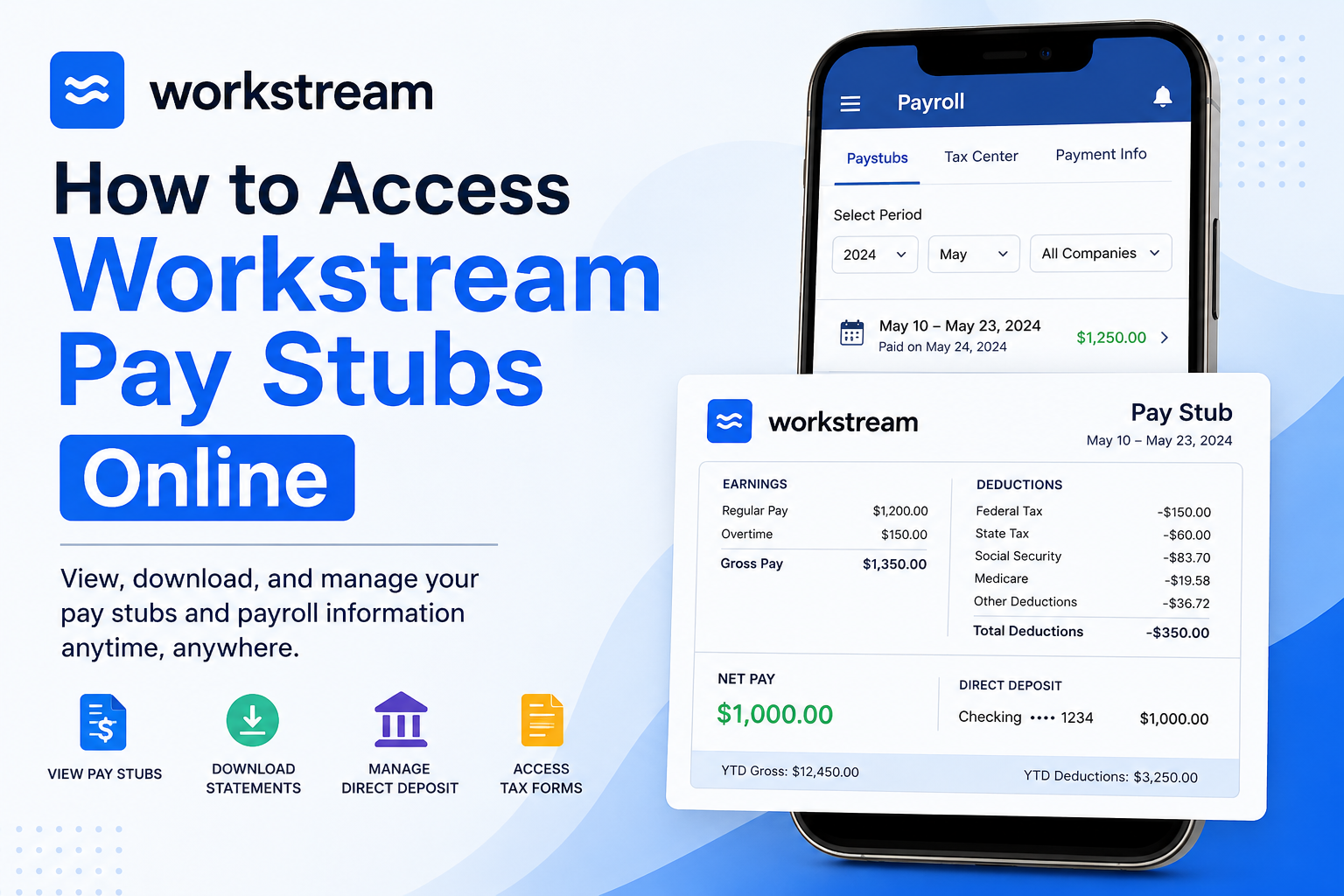
Managing payroll records has become significantly easier with modern HR technology, and Workstream stands at the forefront of that transformation. Trusted by more than 30,000 restaurant locations and 46 of the top 50 quick-service restaurant brands, Workstream provides employees with a streamlined way to access pay stubs, payroll information, and tax documents online. Whether you work for Burger King, Jimmy John’s, Taco Bell, or another company powered by Workstream, you can conveniently review your earnings, download pay statements, update direct deposit information, and manage payroll preferences directly from the Workstream app or payroll portal. This comprehensive guide explains exactly how to access your Workstream pay stubs online, troubleshoot login problems, and securely manage your payroll records.
What Is Workstream?
Workstream is a modern all-in-one HR, hiring, onboarding, and payroll platform designed specifically for hourly workforces and restaurant operations. The platform simplifies employee management by combining hiring, scheduling, onboarding, payroll, and HR services into one centralized system.
Employees can use Workstream to:
- Access pay stubs
- View payroll history
- Download tax forms
- Manage direct deposit
- Update tax withholding information
- Track paid time off balances
- Maintain employee records
Workstream Payroll Login Portal
Employees can access payroll services through the official Workstream Payroll portal:
Official Payroll Login
- Payroll Portal: https://payroll.workstream.us/login
- HR Portal: https://hr.workstream.us/login
You may also access payroll functions through the Workstream US mobile app (Worker Hub).
How to Access Workstream Pay Stubs Online
Follow these step-by-step instructions to view and download your Workstream pay stubs.
Step 1: Open the Workstream App or Payroll Portal
Launch the Workstream US App on your smartphone or visit the payroll login portal in your browser.
Enter your:
- Work email address
- Password
If you are a first-time user, check your email inbox for an invitation link to create your password. Be sure to check your spam or junk folder if the message is missing.
Step 2: Navigate to Payroll
After signing in:
- Tap the ☰ menu in the top-left corner
- Select Payroll
- Tap Paystubs
According to the official Workstream Help Center, employees can manage payroll information, view pay statements, and download tax forms directly inside the app.
Step 3: Find Your Pay Stub
Inside the Paystubs section, you can filter records by:
- Company
- Month
- Year
Once available, the system displays:
- Pay period dates
- Payment date
- Net pay amount
- Payroll history
Step 4: View Pay Stub Details
Tap any pay stub to open the full earnings statement.
Your Workstream pay stub may include:
- Gross pay
- Net pay
- Taxes withheld
- Year-to-date (YTD) totals
- Direct deposit information
- Overtime earnings
- Deductions and contributions
The Workstream Help Center confirms that employees can review gross pay, taxes withheld, YTD totals, and masked bank account details directly from the payroll dashboard.
Step 5: Download Your Pay Stub
To save a copy of your payroll statement:
- Open the desired pay stub
- Tap Download
- Save the file to your device
Downloaded pay stubs are useful for:
- Income verification
- Apartment applications
- Loan applications
- Tax filing
- Employment records
How to Set Up Direct Deposit in Workstream
Workstream also allows employees to configure payment preferences.
Available Payment Methods
Employees may receive wages through:
- Direct deposit
- Paper check
- Cash
Steps to Configure Direct Deposit
- Open the Workstream app
- Tap Payroll
- Select Set Up
- Choose Payment Information
- Enter bank account details
- Authorize payroll processing
Employees may split deposits across up to seven bank accounts using percentage-based or fixed-amount allocations.
How to Access Workstream Tax Documents
Workstream also provides electronic access to payroll tax forms.
Steps to Download Tax Forms
- Open the Workstream app
- Tap Payroll
- Select Tax Center
- Choose the desired tax document
- Tap Download
Employees can access:
- W-2 forms
- Payroll tax records
- Year-end tax statements
How to Enable Paperless W-2 Delivery
Electronic W-2 delivery is recommended because it reduces delays and prevents lost mail.
Enable Paperless Delivery
- Open the Workstream app
- Go to Payroll
- Tap Set Up
- Select Basic or Personal Information
- Locate the W-2 delivery preference
- Check the paperless consent box
- Tap Continue
If you previously selected paper mail, confirm the switch to electronic delivery.
What Information Appears on a Workstream Pay Stub?
A pay stub provides a detailed breakdown of employee earnings and deductions.
According to Workstream’s HR glossary, pay stubs commonly include:
Earnings
- Regular wages
- Bonuses
- Overtime
- Holiday pay
- Vacation pay
- Commissions
Deductions
- Federal taxes
- State taxes
- Medicare
- Social Security
- Insurance premiums
- Retirement contributions
Additional Details
- Net pay
- YTD earnings
- PTO balances
- Tips
- Shift differentials
Common Workstream Payroll Login Problems
Forgot Password
Use the “Forgot Password” option on the login screen to reset your credentials.
Invitation Email Missing
Check:
- Spam folder
- Promotions folder
- Junk mail
No Pay Stubs Showing
If no pay stubs appear:
- Your employer may not have processed payroll yet
- Your account setup may be incomplete
- You may need payroll permissions enabled
Direct Deposit Delays
Verify:
- Routing number
- Bank account information
- Payroll cutoff dates
Benefits of Using Workstream Payroll
Workstream simplifies payroll management for hourly employees by offering:
- Mobile-friendly payroll access
- Secure document downloads
- Paperless payroll management
- Self-service employee records
- Faster tax form access
- Direct deposit management
- PTO visibility
The platform is especially popular among restaurant operators because it centralizes HR, payroll, hiring, and onboarding into one integrated ecosystem.
Workstream Payroll Support
If you need help accessing your pay stubs or payroll account, contact Workstream support:
- Email: help@workstream.is
- Phone: 833-975-7876
Final Thoughts
Workstream makes payroll management remarkably convenient for hourly employees and restaurant teams. Through the Workstream Payroll portal and mobile app, workers can securely access pay stubs, manage direct deposits, download tax forms, and maintain payroll records anytime and anywhere. By following the steps outlined above, you can quickly access your Workstream pay stubs online, stay organized during tax season, and maintain complete visibility into your earnings and payroll history.
Frequently Asked Questions (FAQs)
1. How do I log into Workstream Payroll?
Visit the official Workstream Payroll login page and enter your registered work email address and password to access your payroll dashboard.
2. Where can I find my Workstream pay stubs?
After logging in, go to Payroll > Paystubs to view all available payroll statements.
3. Can I download my Workstream pay stubs?
Yes. Open any pay stub and tap the Download button to save a PDF copy to your device.
4. Does Workstream offer a mobile app?
Yes. Employees can access payroll features through the Workstream US App (Worker Hub) available on mobile devices.
5. What information appears on a Workstream pay stub?
Pay stubs typically include:
- Gross pay
- Net pay
- Taxes withheld
- Direct deposit details
- YTD totals
- Deductions and contributions
6. How do I reset my Workstream password?
Use the “Forgot Password” option on the login page to reset your account credentials securely.
7. Can I access Workstream tax documents online?
Yes. Employees can download W-2s and other tax forms from the Tax Center section inside Payroll.
8. How do I enable paperless W-2 delivery?
Go to Payroll > Set Up > Personal Information and enable the paperless W-2 consent option.
9. What should I do if my pay stubs are missing?
Missing pay stubs may occur if payroll has not yet been processed or if your employer has not enabled payroll access. Contact your HR department for assistance.
10. Can I update direct deposit information in Workstream?
Yes. Employees can add or edit bank account details directly from the Payroll settings section.
11. Does Workstream support multiple bank accounts?
Yes. Workstream allows employees to split direct deposits across multiple bank accounts.
12. Is Workstream payroll secure?
Yes. Workstream uses secure login authentication and encrypted systems to protect employee payroll data.
13. Can former employees access Workstream pay stubs?
Access depends on employer settings. Some employers may disable payroll access after termination.
14. What companies use Workstream Payroll?
Many restaurant and quick-service brands use Workstream, including Burger King, Jimmy John’s, and Taco Bell.
15. Who do I contact for Workstream payroll support?
Employees can contact Workstream support through:
- Email: help@workstream.is
- Phone: 833-975-7876
