Professional truck drivers and transportation associates rely on fast, secure, and uninterrupted access to payroll and tax documents throughout the year. ProDrivers, one of the nation’s leading CDL driver staffing companies and a proud member of the EmployBridge family, provides employees with convenient online systems for viewing pay stubs, managing pay card services, and retrieving year-end tax statements electronically. Whether you are an active employee, temporary associate, or former worker requiring access to historical payroll records, this comprehensive guide explains exactly how to access your ProDrivers pay stubs and W-2 forms online with ease.
About ProDrivers
ProDrivers is widely recognized as one of the largest truck driver staffing companies in the United States, specializing exclusively in CDL driver recruitment and workforce solutions. Through its partnership with EmployBridge, the company supports thousands of drivers and transportation professionals nationwide by offering flexible employment opportunities, workforce support, safety programs, and payroll management solutions.
In addition to employment services, ProDrivers provides employees with streamlined digital payroll tools that allow secure access to earnings statements, tax forms, and direct deposit services twenty-four hours a day.
How to Access ProDrivers Pay Stubs Online
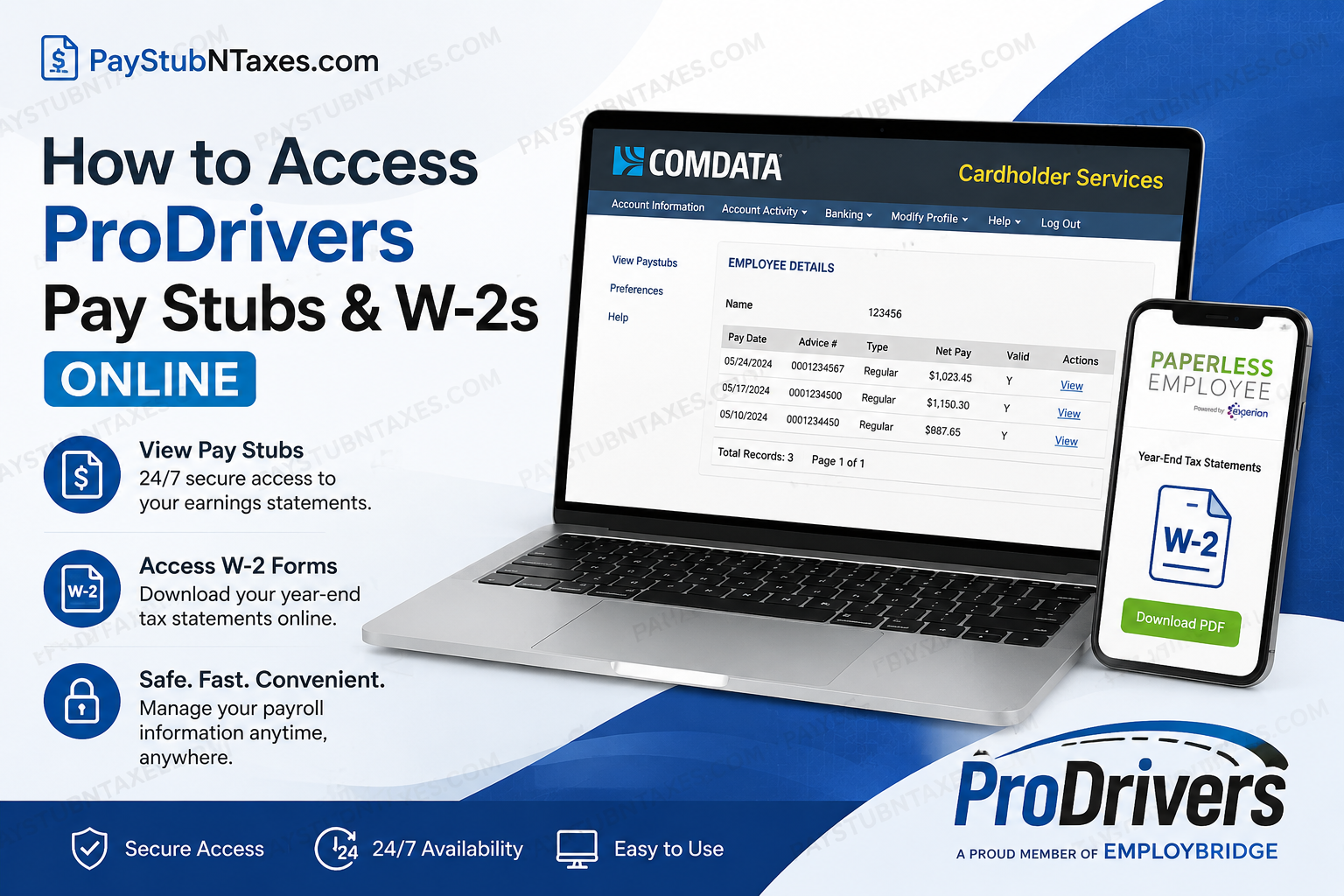
ProDrivers employees can review their pay stubs electronically through the Comdata Cardholder Services portal and the USVerify Paystub system.
ProDrivers Pay Stub Login Portal
Pay Stub Login Link
Employees receiving wages through direct deposit or a pay card can access electronic pay statements online at any time.
Step-by-Step Guide to View ProDrivers Pay Stubs
Step 1: Visit the Comdata Cardholder Services Website
Navigate to the official Comdata login portal and enter your username and password.
New users must complete the registration process before accessing payroll information.
Step 2: Register Your Account
If this is your first login:
- Click “Register Here”
- Enter your card number
- Provide your activation code, which may include:
- Date of birth
- Employee number
- Phone number
- Create a secure username and password
- Set up your PIN and access code
Employees using a Comdata pay card must activate the card before using online services.
Step 3: Access the Paystub Menu
After logging into the Cardholder Web portal:
- Select “Banking”
- Click “Paystub”
The system redirects users to the USVerify Paystub platform in a new browser window.
Important: Popup blockers may prevent the paystub window from opening. Disable popup blockers or allow popups for the site before proceeding.
Step 4: View and Download Your Pay Stub
Once validation is successful:
- The Employee Details screen appears
- Click “View” beside the desired pay date
- Alternatively, select “View Paystubs”
- Download, print, or save your pay statement for personal records
Employees may also configure email or SMS notifications whenever new pay stubs become available.
Alternative Methods to Access ProDrivers Pay Information
ProDrivers offers multiple payroll access options for employees who may not have regular internet connectivity.
Telephone Access via IVR
Employees may retrieve pay information through the Interactive Voice Response (IVR) system by calling:
Comdata Cardholder Services:
1-888-265-8228
Available IVR features include:
- Card balance inquiries
- Transaction history
- Direct deposit transfers
- Reporting lost cards
- Payroll information access
Branch Office Kiosk Access
Employees without internet access may use kiosk computers available at local ProDrivers branch locations to review and print pay stubs.
How to Access ProDrivers W-2 Forms Online
ProDrivers employees can retrieve electronic W-2 tax statements through the Paperless Employee portal powered by Experian Employer Services.
W-2 Portal Login
Official W-2 Website
First-Time Registration for Paperless Employee
Employees accessing the system for the first time must create an account.
Information Required for Registration
You will need:
- Associate ID
- Social Security Number (without dashes)
- First three letters of your last name in uppercase
- Date of birth
- Valid email address
How to Create a Paperless Employee Account
Step 1: Open the Registration Page
Click “Create Account” on the Paperless Employee login screen.
Step 2: Verify Your Identity
Enter the required personal details and complete identity authentication.
The system may send a verification code through:
- Text message
- Automated phone call
Step 3: Create Login Credentials
Employees must:
- Create a User ID
- Create a secure password
- Select security questions
- Verify contact information
Step 4: Opt In to Electronic Tax Statements
To receive W-2 forms electronically:
- Select “Yes” under electronic statement delivery
- Choose notification preferences
- Save notification settings
Electronic delivery allows employees to access W-2 forms immediately once released.
How to Download ProDrivers W-2 Forms
After logging into Paperless Employee:
- Click “Year-End Tax Statements”
- Select “Access Current Year-End Statements”
- Click “Download PDF”
- Save or print the W-2 form
Employees can download tax forms multiple times during the availability period.
Forgot Your Paperless Employee Password?
If you cannot remember your login credentials:
- Click “Forgot User ID or Password”
- Verify your identity
- Reset your password using verification codes or security questions.
ProDrivers Direct Deposit and Pay Card Services
ProDrivers employees may receive wages through:
- Direct deposit
- Comdata pay cards
- Payroll card systems
The Comdata platform also allows employees to:
- Transfer payroll funds to bank accounts
- Check balances online
- Use ATMs nationwide
- Monitor transaction history
Benefits Available to ProDrivers Employees
In addition to payroll services, eligible employees may receive access to a broad range of employment benefits, including:
- Medical insurance
- Dental coverage
- Vision plans
- Employee Assistance Programs
- Retirement savings options
- Holiday pay
- Referral bonuses
- Training and skill development
Troubleshooting ProDrivers Payroll Access Issues
If you experience difficulty accessing your pay stubs or W-2 forms:
Common Solutions
- Verify your username and password
- Disable popup blockers
- Use a supported browser
- Reset forgotten credentials
- Confirm your Social Security Number and Associate ID
- Ensure your account is fully activated
ProDrivers Payroll Support Contact Information
For additional assistance regarding pay stubs, W-2 forms, payroll access, or account registration:
ProDrivers / EmployBridge Support
Phone: 877-785-5125
Employees may also contact their local branch office for payroll support and account assistance.
Final Thoughts
ProDrivers has implemented a reliable and highly accessible payroll ecosystem that allows employees to securely retrieve pay stubs, manage payroll cards, and download W-2 tax statements from virtually anywhere. Through the integration of Comdata Cardholder Services and Paperless Employee, workers benefit from convenient twenty-four-hour access to critical payroll information without relying on paper documentation. Whether you need weekly earnings statements, historical pay records, or year-end tax documents, the ProDrivers online payroll system offers a streamlined and secure solution tailored to today’s workforce.
Frequently Asked Questions (FAQ)
1. Where can I view my ProDrivers pay stubs online?
You can view your ProDrivers pay stubs through the Comdata Cardholder Services website. After signing in, navigate to the Banking menu and select “Paystub.”
2. What is the official ProDrivers pay stub login website?
The official pay stub portal is: https://w6.iconnectdata.com/chth/Controller?XFunction=LoginPage
3. How do I register for the ProDrivers pay stub portal?
First-time users must click “Register Here” on the Comdata portal and provide their card number along with an activation code such as their date of birth, employee number, or phone number.
4. Can former ProDrivers employees access pay stubs online?
Yes. Former employees may still access electronic payroll records if their online account remains active and valid.
5. How do I access my ProDrivers W-2 online?
Employees can retrieve W-2 forms through the Paperless Employee website: https://www.paperlessemployee.com/Associates/PE.
6. What information is required to create a Paperless Employee account?
You typically need:
- Associate ID
- Social Security Number
- Date of birth
- First three letters of your last name in uppercase
7. What should I do if I forgot my ProDrivers pay stub password?
Use the “Forgot Username or Password” option on the login page and complete the identity verification process to reset your credentials.
8. Are ProDrivers’ pay stubs available 24/7?
Yes. Employees can access pay stubs online twenty-four hours a day, seven days a week.
9. Can I receive notifications when my pay stub becomes available?
Yes. The system allows employees to receive email or SMS notifications whenever a new pay stub is posted.
10. Does ProDrivers offer direct deposit?
Yes. Employees may receive wages through direct deposit or through the Comdata pay card program.
11. What is the Comdata pay card used for?
The Comdata pay card allows employees to receive payroll electronically, withdraw cash, check balances, and access transaction history.
12. Can I access ProDrivers pay information by phone?
Yes. Employees can use the Interactive Voice Response (IVR) system by calling 1-888-265-8228 to obtain payroll and card information.
13. Why is the pay stub page not opening?
Popup blockers may prevent the USVerify pay stub window from opening. Disable popup blockers or allow popups for the site before attempting access again.
14. Can I print my ProDrivers W-2 form?
Yes. After downloading the PDF from Paperless Employee, you can print or save the document for tax filing purposes.
15. Who should I contact for ProDrivers payroll support?
For payroll or W-2 assistance, contact your local branch office or call ProDrivers/EmployBridge support at 877-785-5125.
